Vendor risk · ProjectSight integration
Quick answer
Trimble ProjectSight does not include a subcontractor prequalification module. GCs running projects in ProjectSight typically prequalify subs with a PDF or spreadsheet questionnaire, store the results outside the platform, and re-collect insurance and tax documents again at contract award. A connected compliance platform such as Billy runs prequalification, certificate of insurance verification and ongoing document tracking against the same vendor and contract records ProjectSight already holds, so the sub is qualified once and stays compliant through payment.
If you are a general contractor running projects in ProjectSight, you already have the pieces of a vendor risk process: a company directory, a contract record per subcontractor, cost and change order control, and a document repository. What you don’t have is a way to answer the question every risk manager gets asked after a loss: was this sub qualified to be on our job, and can we prove it?
This guide covers how prequalification, compliance and payment fit together on ProjectSight projects, what the platform handles natively, and how to connect the gaps so a subcontractor is evaluated once and tracked continuously. If you run Procore instead, the companion piece is Subcontractor Prequalification in Procore.
What subcontractor prequalification covers
Prequalification is the review a GC performs before inviting a sub to bid or awarding a contract. A complete prequal file typically includes:
- Financial capacity: bonding limits, working capital, backlog, banking and surety references.
- Safety record: EMR, OSHA 300 logs, recordable and lost-time rates, written safety program.
- Insurance: current certificate of insurance with limits, carriers and the endorsements your contract requires.
- Legal and tax: W-9, business and trade licenses, litigation history, MWBE or other certifications.
- Experience: comparable project references, key personnel, trade scope.
Most of these documents expire or change. Insurance renews annually, licenses lapse, EMR is recalculated every year. Prequalification that ends at approval is a snapshot; compliance is what keeps the snapshot current while the sub is on site and being paid.
What ProjectSight handles natively
ProjectSight is a project management and cost control platform. Its strengths for vendor risk are on the contract side:
| Vendor risk step | In ProjectSight |
|---|---|
| Company directory with contacts | Yes |
| Contract record with value, scope and change orders | Yes (Cost Management) |
| Attach documents to a company or contract | Yes |
| Custom forms and fields | Yes |
| Prequalification questionnaire and scoring | Not native |
| COI reading and requirement comparison | No |
| Endorsement verification | No |
| Automated document requests and renewals | No |
| Compliance status visible at payment (via Vista / Spectrum) | Only if maintained manually |
Based on publicly documented ProjectSight capabilities as of September 2026. Verify against Trimble’s current documentation.
In practice, ProjectSight teams build a prequal process around the platform using custom forms for the questionnaire, document attachments for the evidence, and custom fields for dates. It works, with two structural weaknesses: nothing verifies the documents, and nothing re-collects them when they expire. For a closer look at the second problem, see How to Track COIs in ProjectSight.
The connected workflow: prequal to payment on ProjectSight
Here is how the process runs when Billy is connected to ProjectSight. The goal is one vendor record, one set of requirements, and no re-keying between systems.
-
Vendor applies once
The sub completes Billy’s prequalification form online. No login required. Financials, safety data, references, W-9, licenses and a current COI are collected in a single submission.
-
Documents are verified, not just filed
Billy’s AI Review Assistant reads the certificate, extracts limits, carriers and dates, and checks endorsements such as additional insured, primary and non-contributory and waiver of subrogation against your standard requirements.
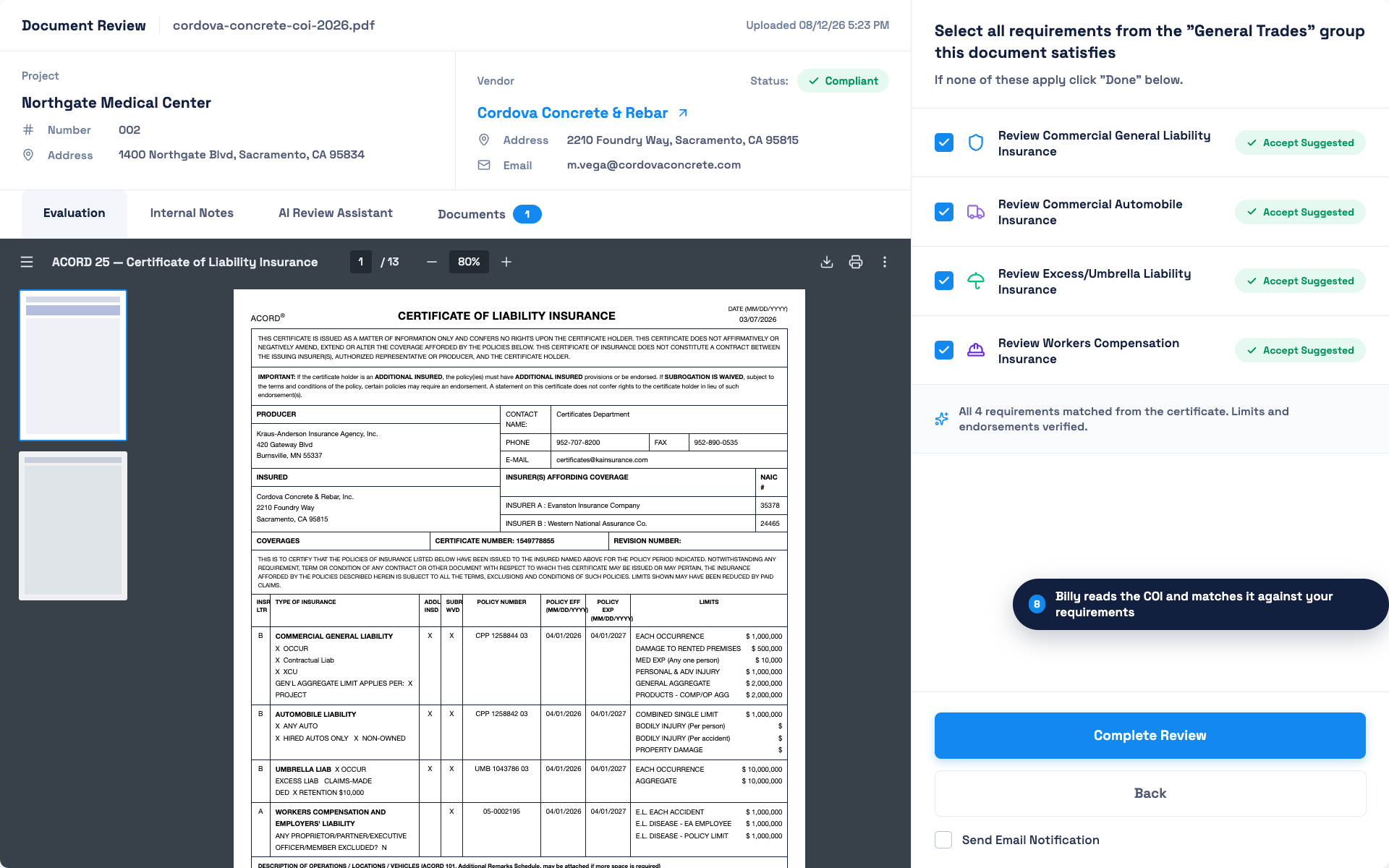
Billy reads the ACORD 25 and matches every coverage line to your requirement group. Limits and endorsements are verified before a reviewer signs off. -
Risk team approves with a scored profile
Reviewers see a single vendor profile with financial ratios, EMR, insurance compliance and open items. Approval, conditional approval or decline is recorded with an audit trail.
-
Contract is awarded in ProjectSight
The project team creates the subcontract in ProjectSight as usual. Through the ProjectSight integration, the project, vendor and contract sync to Billy and the project’s default requirement group is applied automatically.
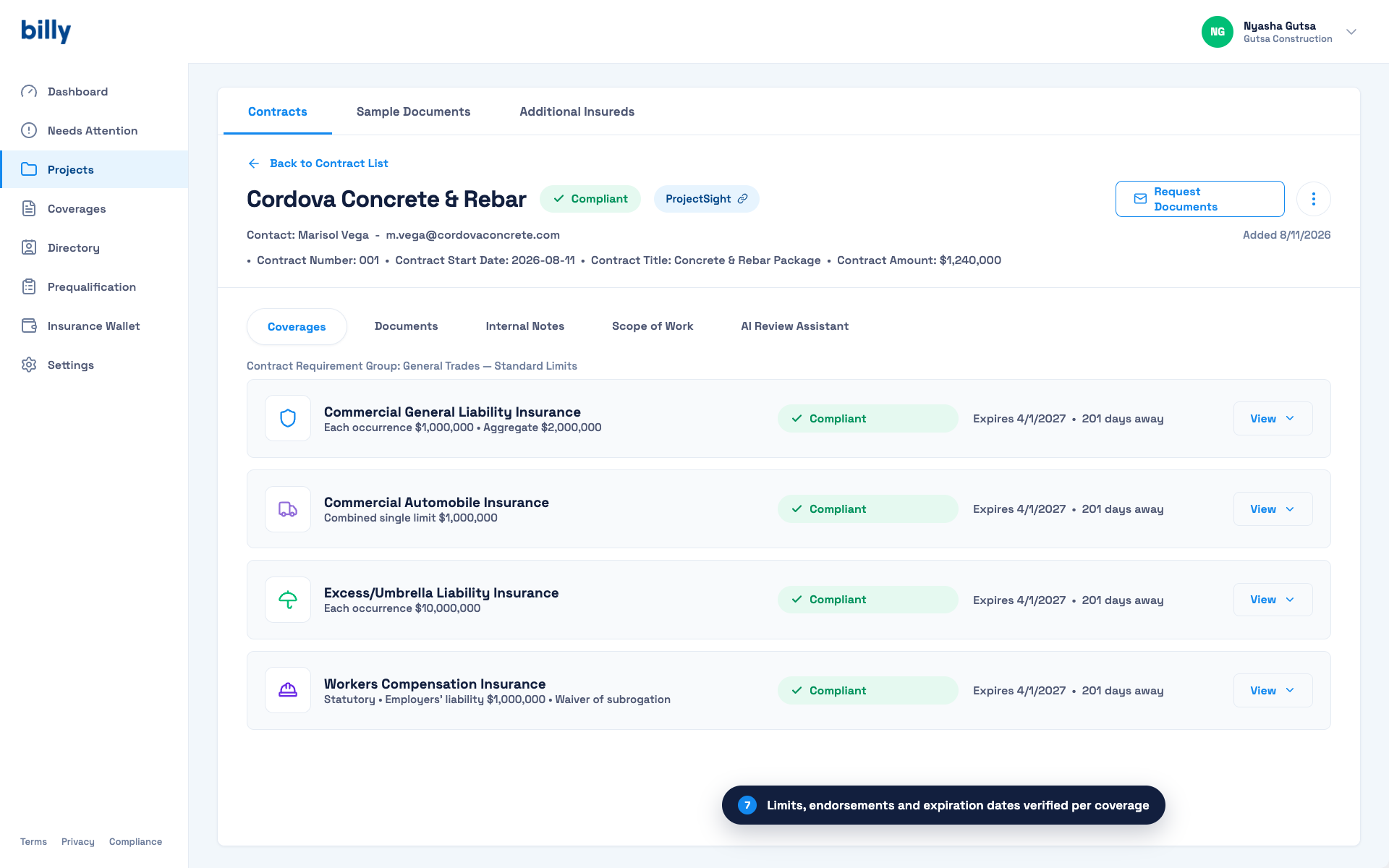
A subcontract synced from ProjectSight. Contract number, title and amount carry over; each required coverage shows status, limits and days to expiration. -
Gaps are chased automatically
If the project requires higher limits than the sub’s prequal COI showed, or a project-specific additional insured, Billy sends the request to the sub and broker and follows up until the certificate is compliant.
-
Compliance stays current through payment
Renewals are requested ahead of expiration. Compliance status is reportable per project and per vendor, and can be surfaced to your ERP so a non-compliant sub is caught before a pay application clears. See our guide to stopping AP compliance holds in Viewpoint Vista.

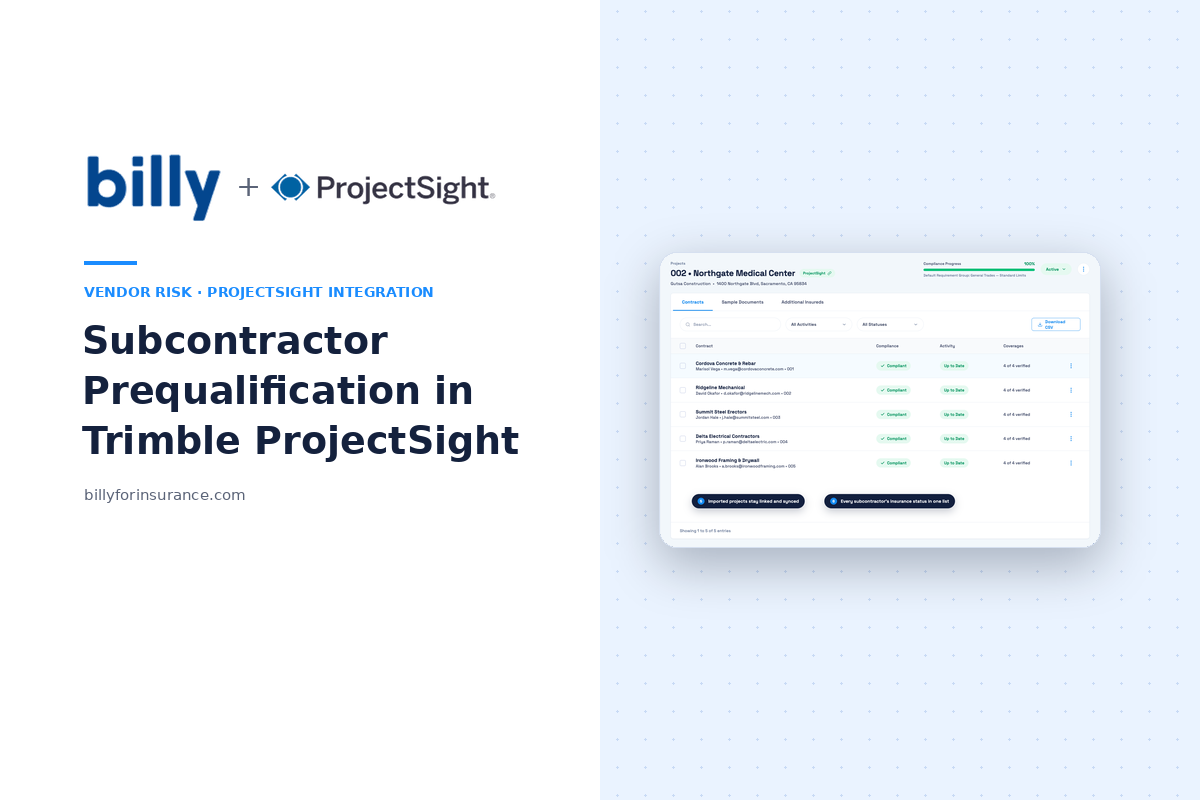
Project-level view: every subcontractor’s insurance status in one list, with compliance progress for the whole ProjectSight project.
Why the connection matters: prequalification data that lives in a separate portal, and COIs that live in a shared drive, cannot protect you at the moment a payment is processed. Compliance has to travel with the vendor record from application to award to pay app. That is the argument in The Connected Construction Compliance Workflow.
Connecting Billy to ProjectSight: step by step
Setup takes a few minutes and requires a Trimble account with access to your ProjectSight portfolio. There are no API keys to generate or manage.
-
Open Connected Apps in Billy
Go to Settings → Connected Apps and click Setup on the Trimble ProjectSight card. Procore, Autodesk and Docusign connections live on the same screen.
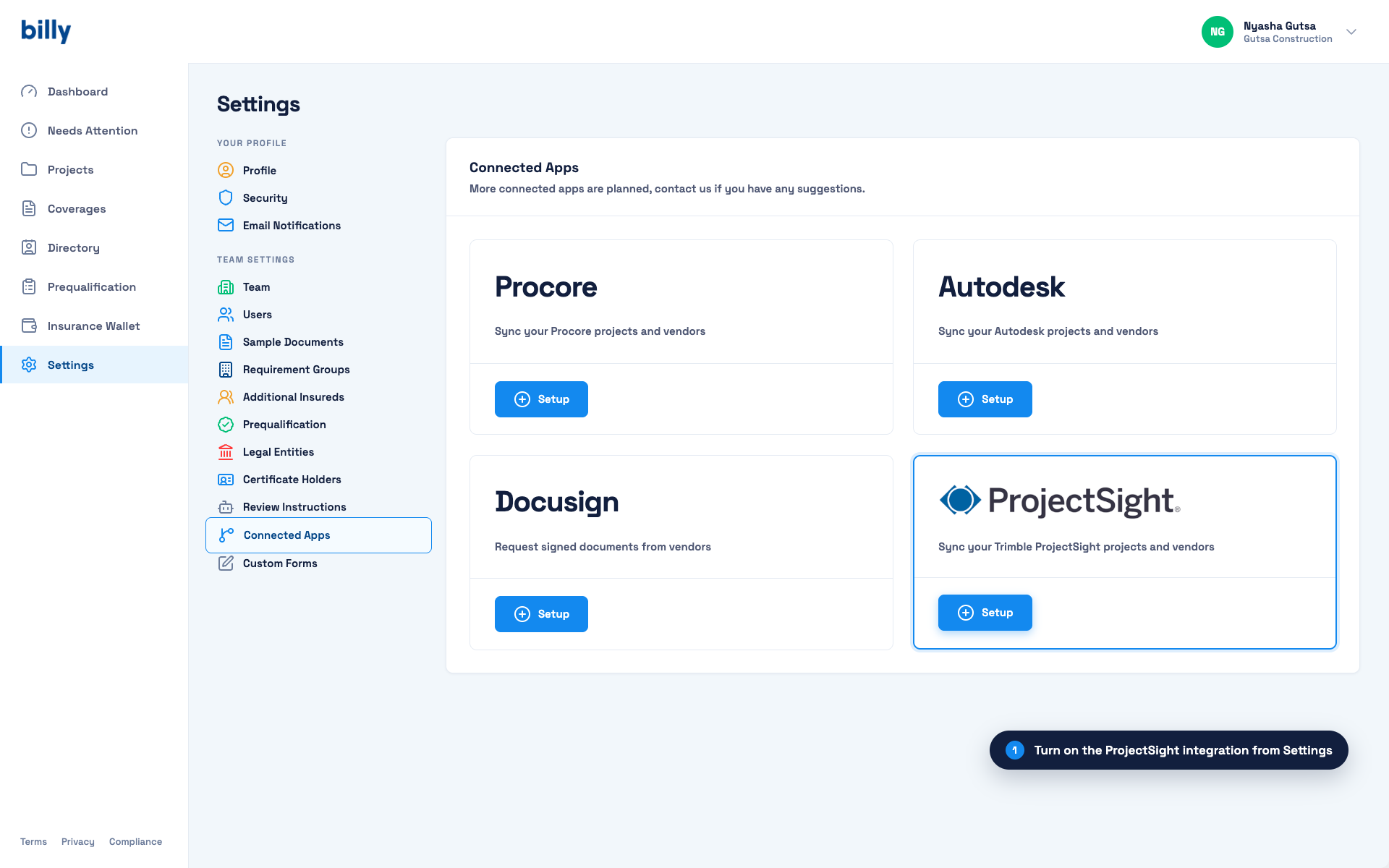
Step 1: turn on the ProjectSight integration from Settings → Connected Apps. -
Sign in with your Trimble account
Click Log in to ProjectSight. You are redirected to Trimble to authenticate, then returned to Billy. Sign in once; Billy holds the authorization from there.
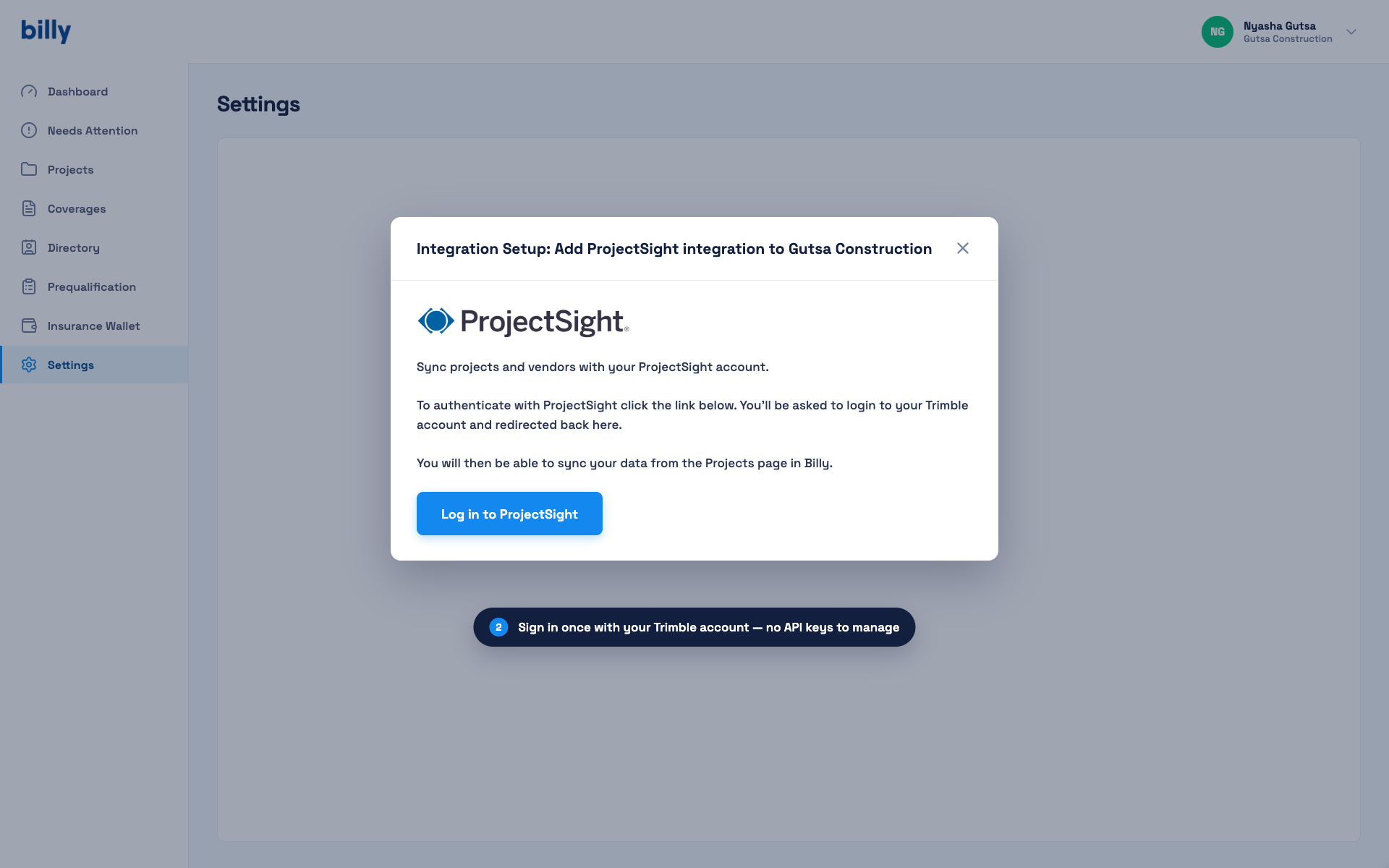
Step 2: authenticate once with your Trimble account. No API keys to manage. -
Select the ProjectSight portfolio
Choose which ProjectSight portfolio this Billy team should connect to. GCs with multiple business units or regions map each Billy team to its own portfolio.
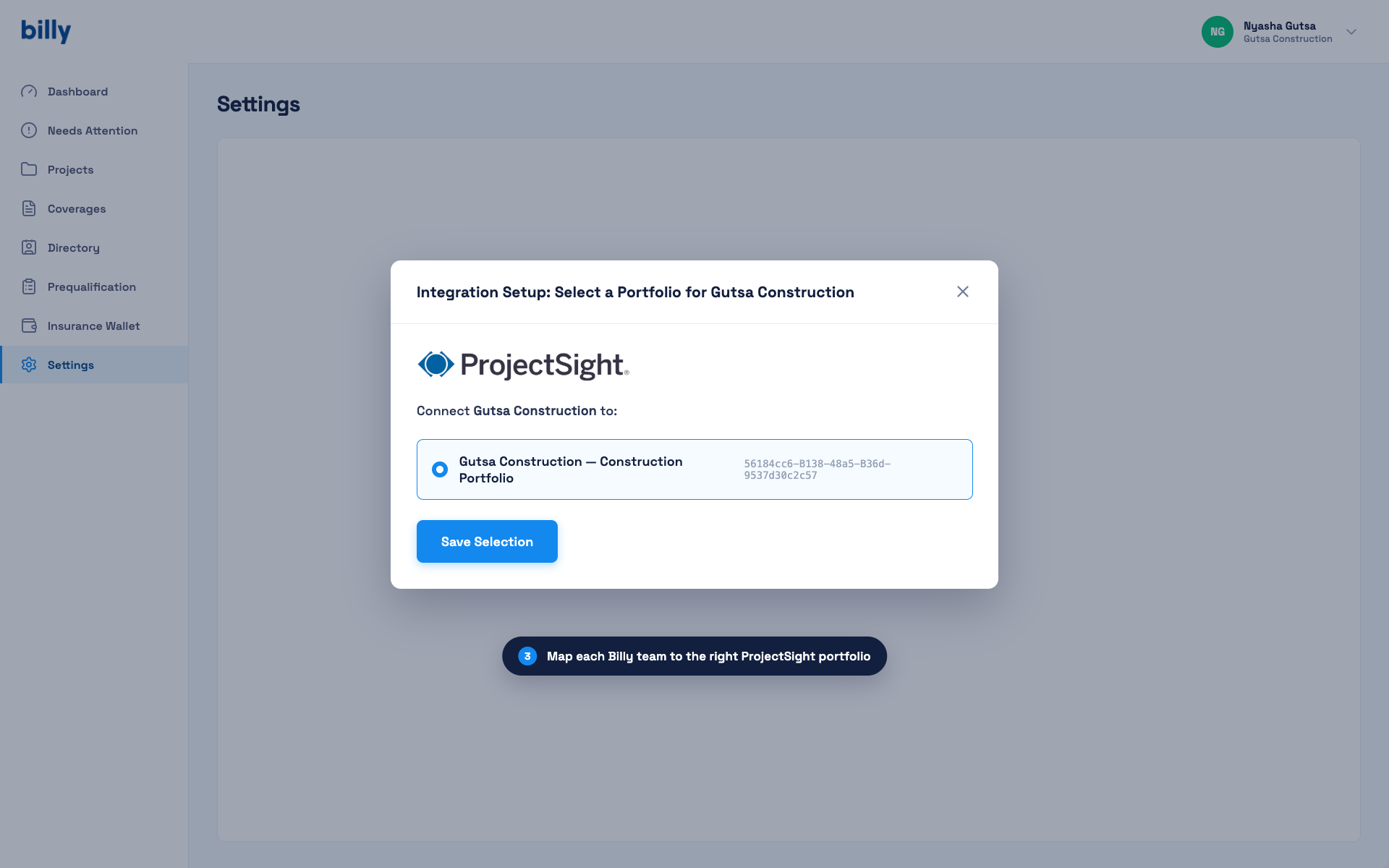
Step 3: map each Billy team to the right ProjectSight portfolio. -
Import projects, vendors and contracts
Pick a default contract requirement group (for example General Trades — Standard Limits), choose Projects, vendors and contracts, and tick the active ProjectSight projects to import. Vendors and contracts on those projects come across with them, and stay synced.
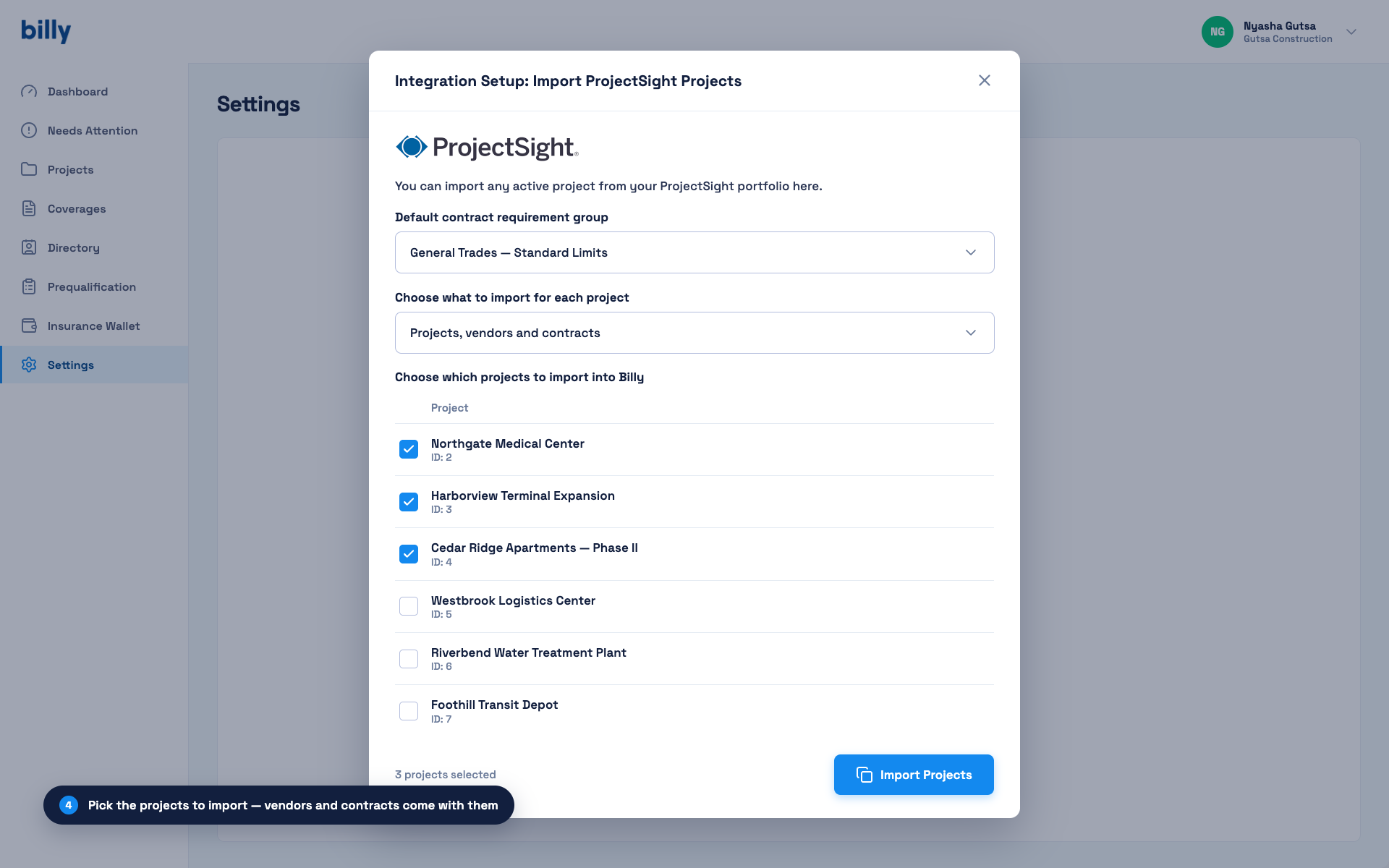
Step 4: pick the projects to import. Vendors and contracts come with them. -
Start collecting and verifying
Imported projects appear in Billy with a ProjectSight badge. Billy applies the requirement group to each contract, sends certificate requests to subs and brokers, and begins tracking. Existing certificates already attached in ProjectSight can be uploaded in bulk so you begin with a complete compliance picture rather than a blank slate.
Before you connect: three decisions
- Write your standard requirements once. Coverage lines, minimum limits, required endorsements and the document set (W-9, licenses, bonds, safety data) for each contract tier. These become your requirement groups in Billy. If you’re starting from a spreadsheet, our free COI tracking template shows the fields worth capturing.
- Decide who reviews. In-house risk staff using Billy’s self-service plan, or Billy’s Managed Plan with licensed insurance professionals handling review.
- Pick your reports. Compliance by project, expiring documents by month, and non-compliant vendors currently under contract are the three most GCs run weekly. See 13 vendor compliance reports every contractor needs.
Frequently asked questions
Does Trimble ProjectSight have a subcontractor prequalification tool?
No. ProjectSight provides a company directory, contract records, custom forms and document attachments, but no dedicated prequalification questionnaire, scoring or approval workflow. GCs typically use a connected compliance platform such as Billy for prequalification on ProjectSight projects.
Can I prequalify subs in ProjectSight using custom forms?
You can build a questionnaire with custom forms and attach supporting documents to the company record. The limitation is that ProjectSight does not verify the documents, score the responses or re-collect expired items, so the process depends on manual review and manual renewal tracking.
How does Billy’s ProjectSight integration work?
You connect Billy to ProjectSight from Settings → Connected Apps, sign in with your Trimble account, select a portfolio and import projects. Projects, vendors and contracts sync into Billy, which applies your requirement groups, requests and verifies certificates, follows up automatically and reports compliance per vendor and project. Details are on the Trimble ProjectSight integration page.
Do I need API keys to connect ProjectSight and Billy?
No. Authentication is a one-time sign-in with your Trimble account. There are no API keys to generate, store or rotate.
Do subcontractors need a ProjectSight or Billy account?
No. Subcontractors and their brokers complete the prequalification form and upload documents through an emailed link. No login is required.
What if a sub is already prequalified but the project needs higher limits?
Billy compares the sub’s current certificate against the project’s requirement group when the contract syncs from ProjectSight. If limits or endorsements fall short, Billy automatically requests an updated certificate from the sub and broker.
Prequalify once. Stay compliant through payment.
See Billy’s prequalification and COI tracking connected to ProjectSight.
Request a demo