Key takeaways
- ProjectSight can store insurance documents, but it does not natively review COIs, verify endorsements, or manage renewals.
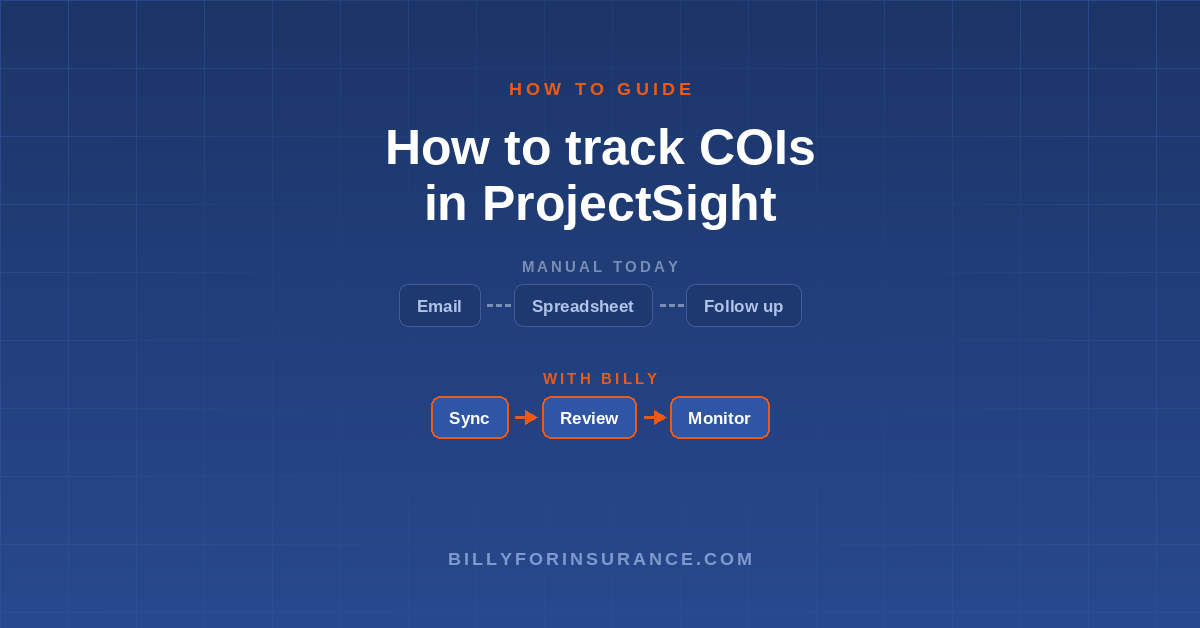
- The manual path uses a spreadsheet, an inbox, and a shared drive. Expiration dates, inconsistent intake, and unreviewed documents create gaps as vendor counts grow.
- The connected path imports ProjectSight projects, contracts, and vendors into Billy. Billy applies insurance requirements, collects documents, reviews coverage, sends renewal reminders, and keeps an audit trail.
- The sync is one-way, from ProjectSight into Billy. ProjectSight stays your project record, and compliance lives in Billy.
What ProjectSight tracks and what it leaves to you
ProjectSight manages the records you need after a contract is awarded. You can maintain a company directory, create contract records with scope and value, and track change orders. You can attach documents to company or contract records and create custom forms or fields. Subcontractors and suppliers get free Collaborator licenses to respond to assigned records and upload files, according to Trimble’s ProjectSight guide.
ProjectSight does not include an insurance compliance workflow. It does not score subcontractors during prequalification, read a COI against contract requirements, verify endorsements, or request replacement documents when policies expire. Our ProjectSight prequalification guide covers these gaps in detail.
A stored document proves someone uploaded a file. It does not establish compliance. The attached COI could show insufficient limits, an expired policy, or missing additional insured language. A custom field can record an expiration date, but someone must read the document, enter the value correctly, and update it later.
The manual workflow and where it breaks
Manual COI tracking around ProjectSight splits one compliance record across several places. After awarding a contract, you request the certificate by email, record policy dates in a spreadsheet, and save the COI in a shared drive or as a ProjectSight attachment. You may add a calendar reminder for the expiration date.
The workload is manageable at 1 to 25 active vendors. It starts to break between 25 and 150 as expirations accumulate faster than one person can monitor them. Above 150, automated collection, review, and renewal tracking become necessary, according to Billy’s COI tracking guide.
Three weaknesses cause the breakdown:
- A spreadsheet records dates but does not act on them. Someone still has to find the contact, send the request, and log the response.
- Email is not structured intake. Certificates and endorsements arrive in different threads and formats. Staff must match each file to the right subcontractor, contract, and project.
- Storing a certificate does not verify it. Someone must compare the insured name, dates, limits, additional insured status, and endorsements against the contract.
When a policy expires, ProjectSight does not reissue the request, review the replacement, or update a verified status.
The connected workflow: ProjectSight plus Billy
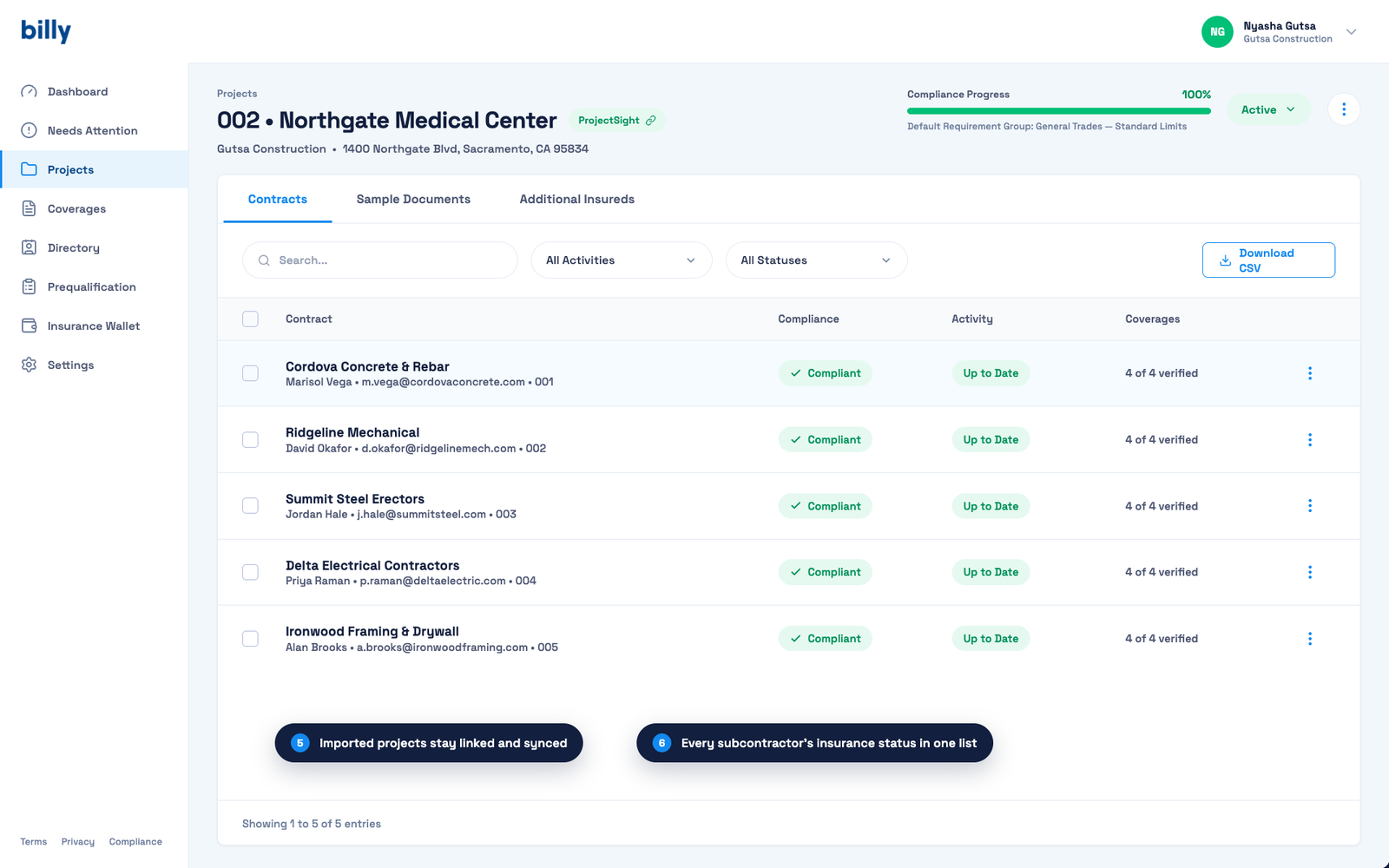
ProjectSight remains the source for project, contract, and vendor records. Billy manages the insurance compliance tied to those records. Billy imports the data and applies requirement groups based on each contract’s limits, policy types, additional insured status, and required endorsements. See the ProjectSight integration page for product details.
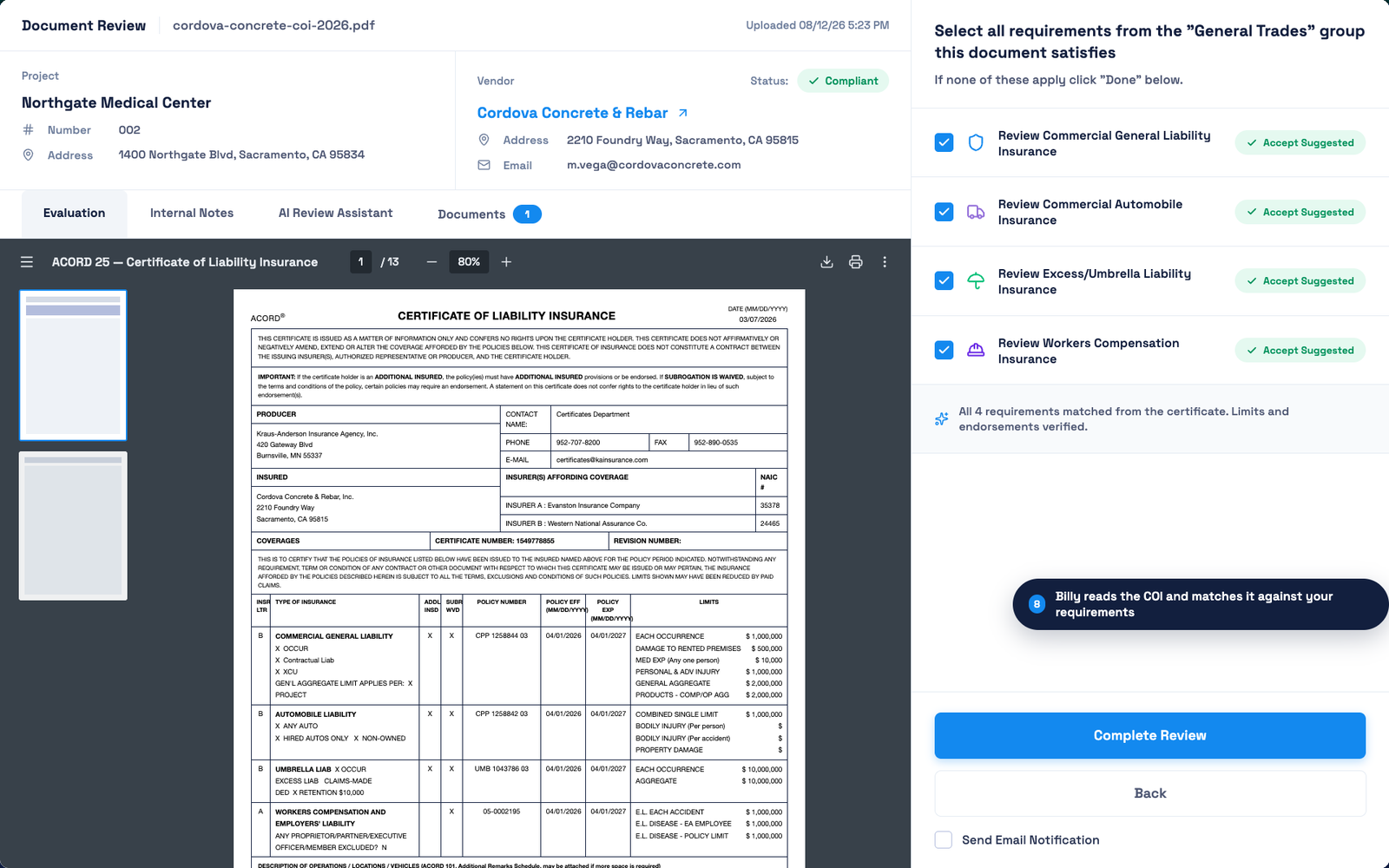
Billy collects COIs and endorsements through structured intake. Its AI compares each submission with the assigned requirements and flags missing documents, insufficient limits, incorrect insured names, and dates that do not span the project.
Renewal tracking continues after approval. Billy monitors expiration dates and sends reminders until a verified replacement arrives. Every request, submission, review, and status change lands in a timestamped audit trail you can use at payment review, in an audit, or at closeout.
Step-by-step: setting up COI tracking for ProjectSight projects
Step 1: Connect ProjectSight with your Trimble ID
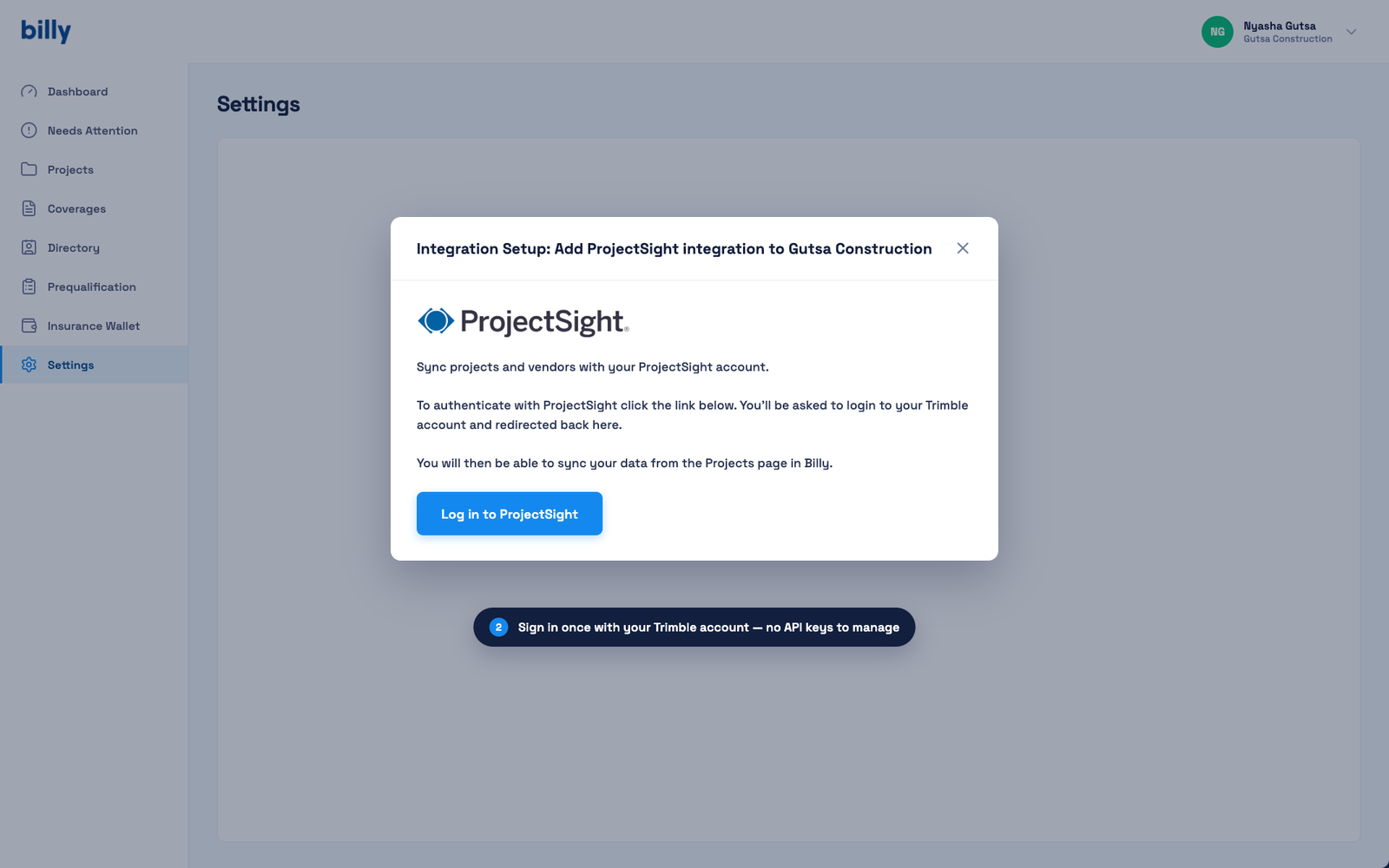
In Billy, open Settings and add the ProjectSight integration. A ProjectSight administrator clicks “Log in to ProjectSight” and signs in with a Trimble account. There are no API keys to manage.
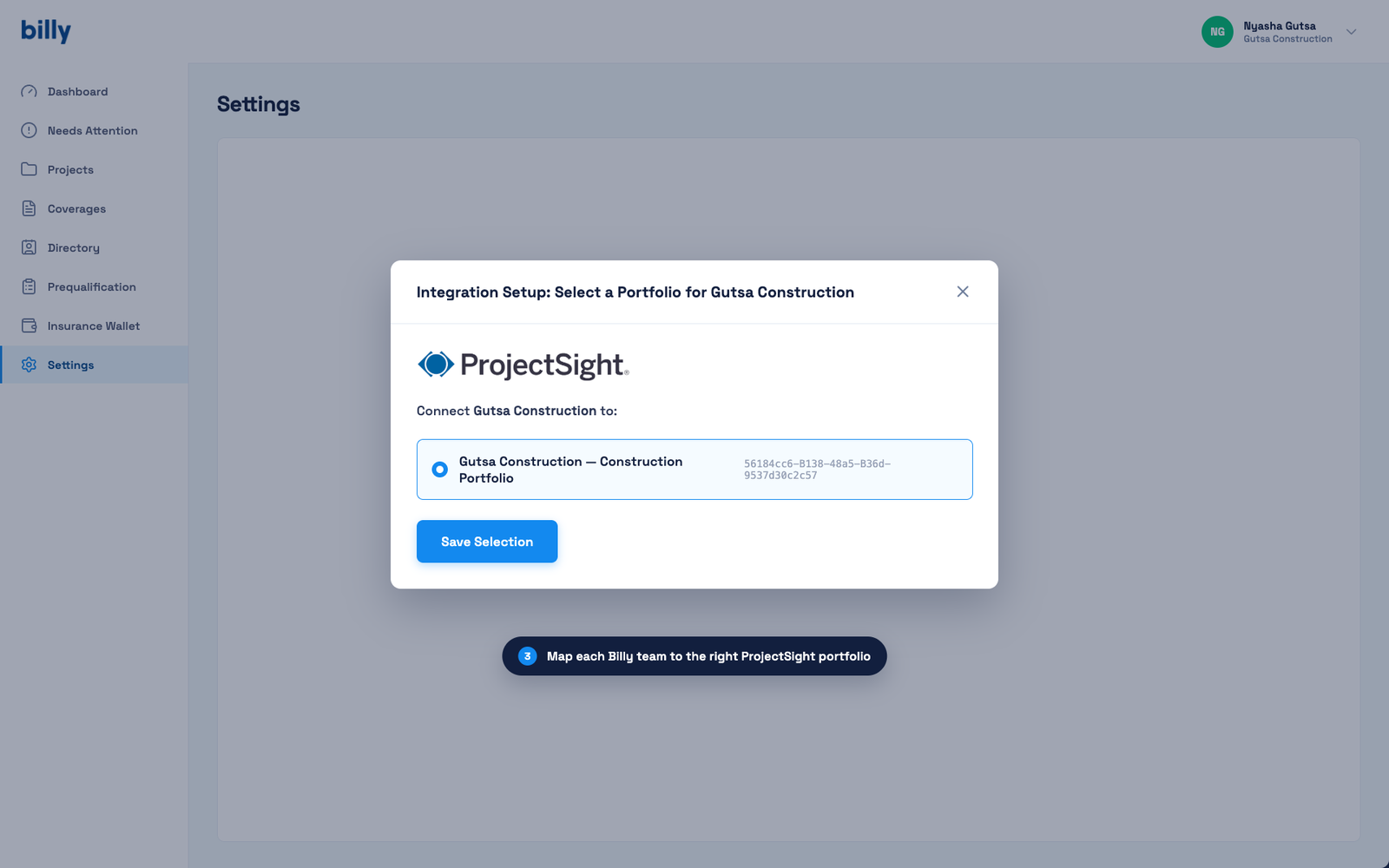
Step 2: Select your ProjectSight portfolio
Map your Billy team to the right ProjectSight portfolio and save the selection. Companies with several portfolios can map each Billy team separately.
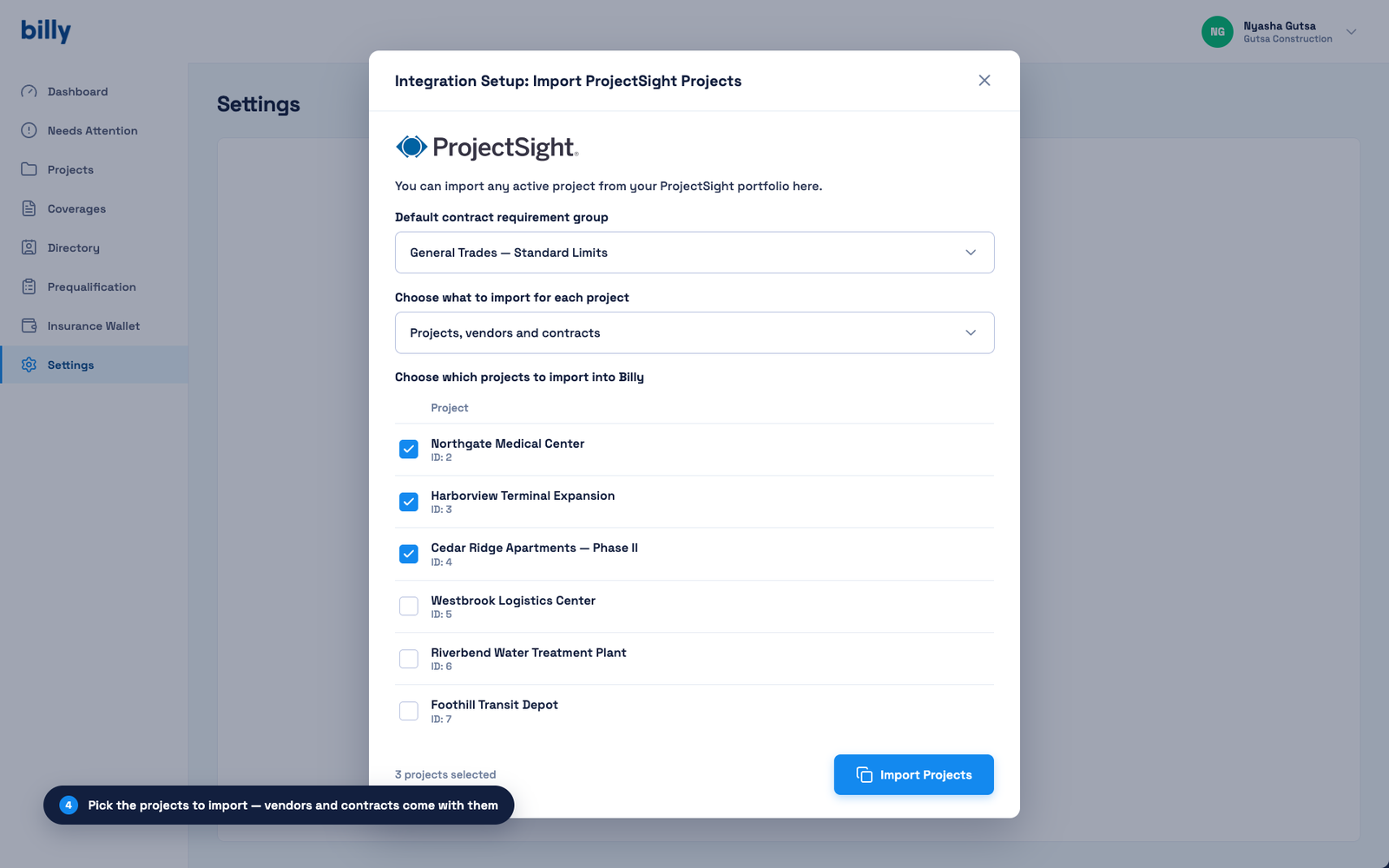
Step 3: Import projects, vendors, and contracts
Choose a default contract requirement group, choose what to import (projects, vendors and contracts), and tick the active projects you want Billy to track. Vendors and contracts come with each project, so nothing is re-keyed. After import, Billy checks those projects every hour for new contracts.
Step 4: Activate the project and collect documents
Imported projects arrive in Draft. Review the requirement group, adjust it for any contract that needs different limits or endorsements, then switch the project to Active. Billy emails each subcontractor or broker a secure upload link, with no login to create, and follows up automatically.
Step 5: Review each submission against the contract
Billy’s AI Review Assistant reads the uploaded certificate and endorsements and matches them to the requirement group: insured name, policy dates, limits, additional insured, and waiver of subrogation. Your reviewer accepts the suggestions or requests a correction. New to the form? See ACORD 25 explained.
Step 6: Track coverages and renewals
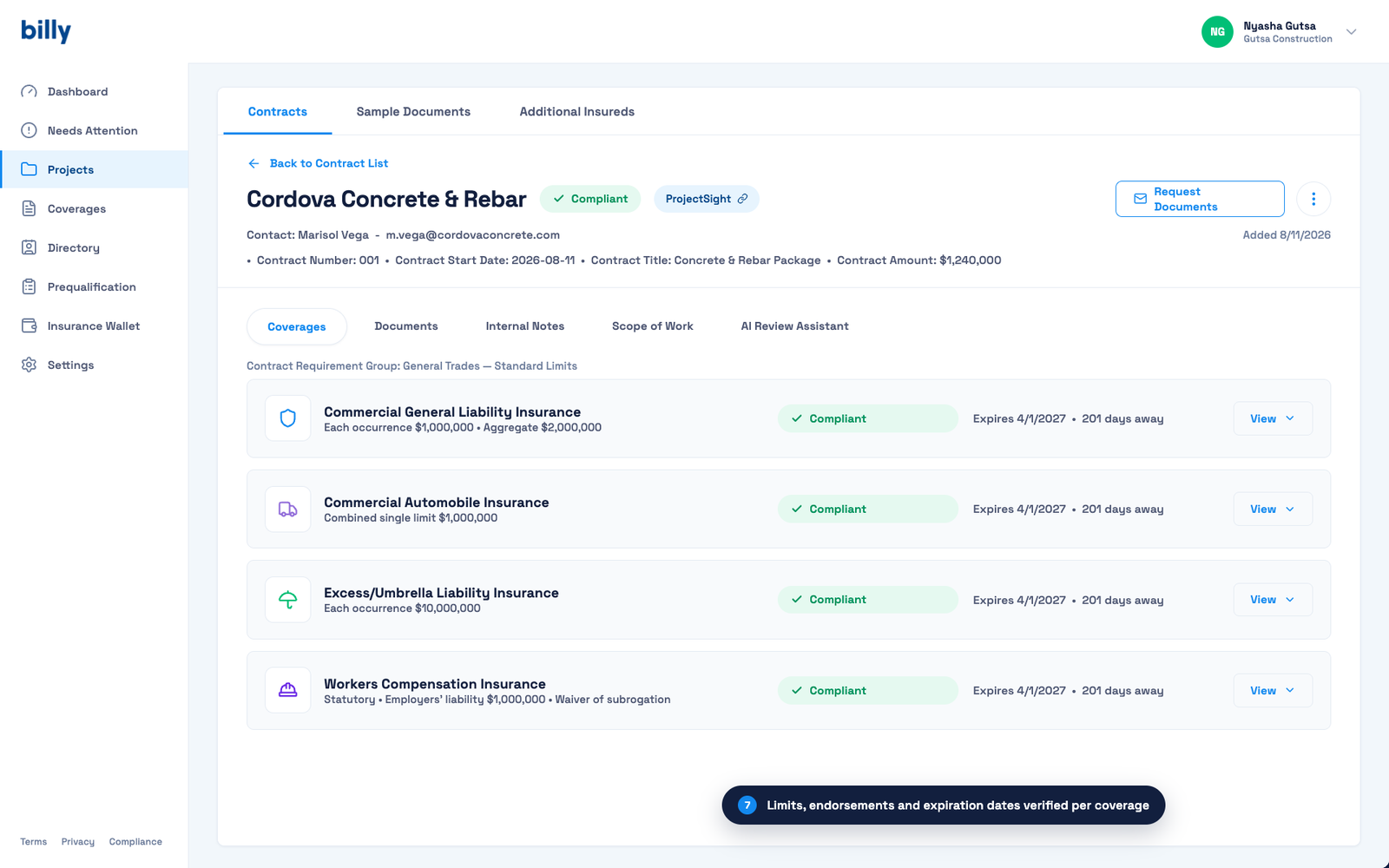
Each contract shows every coverage line with its limits, status and days until expiration. Set reminders to start 60 days before expiration, follow up at 30, and escalate at 14 and 7. Reminders stop when a verified renewal arrives.
Step 7: Pull an audit report at payment review or closeout
Download the project’s compliance report to show every COI received, its review date, the decision and the supporting documents. Keep expired certificates so you can show what was verified at any point in time. See the 13 vendor compliance reports worth running.
If your accounting runs through Viewpoint Vista, Billy’s separate Vista integration makes compliance status available to AP so a noncompliant subcontractor can be held before payment.
COI compliance checklist for ProjectSight projects
- Record the ProjectSight project, contract, and subcontractor name.
- Record the subcontractor’s legal entity name and EIN.
- Define every required policy type before onboarding.
- Record per-occurrence and aggregate limits.
- Confirm policy dates cover the subcontracted work period.
- Confirm the certificate names the correct insured entity.
- Verify additional insured status for the required parties.
- Collect each required endorsement as a linked document.
- Verify primary and non-contributory wording when required.
- Verify waiver of subrogation endorsements on every required policy.
- Record the carrier name and NAIC number.
- Record the reviewer, review date, and compliance outcome.
- Start renewal outreach at least 30 days before expiration.
- Escalate unresolved renewals to the broker and subcontractor contact.
- Archive expired documents instead of deleting them.
- Preserve a timestamped audit trail.
Frequently asked questions
Does ProjectSight include native COI tracking?
No. ProjectSight can store COIs as attachments, and you can add custom fields for dates. It does not read certificates, compare coverage against requirements, verify endorsements, or request renewals.
Is the ProjectSight and Billy connection a one-way import or a two-way sync?
One-way. Projects, contracts, and vendor records import from ProjectSight into Billy. Billy does not write data back into ProjectSight. Billy checks connected projects every hour for new contracts and updates vendor records when details change.
What happens to COIs already attached in ProjectSight?
They stay in ProjectSight, but an attached PDF is not a verified compliance record. Upload current COIs and endorsements into Billy so it can review them, track expirations, and keep the review history.
How does Billy work with payment holds and Vista?
Contractors using Viewpoint Vista can connect Billy’s compliance status to payment controls, so an expired or deficient vendor can trigger a hold according to company policy.
Does this make sense for a small vendor list?
A spreadsheet can work below 25 vendors, and our free COI tracking template is a good start. Automated collection and renewals pay off as vendor counts rise or when one subcontractor works across projects with different requirements.
Get started
ProjectSight manages project records. Billy handles insurance requirements, document review, renewals, and compliance history. A connected setup gives each tool a defined job and removes the handoffs among spreadsheets, email, and shared folders.
Request a demo to see the workflow on your own ProjectSight projects.
See it on your own vendors and projects.
Request a demo