Platform comparison · Subcontractor compliance
Quick answer
Trimble ProjectSight and Procore both give general contractors a vendor directory, a contract record per subcontractor and a place to attach documents. Procore adds native insurance fields and a paid prequalification module; ProjectSight is leaner on compliance but tighter with Trimble’s ERPs. Neither platform reads a certificate of insurance, compares limits and endorsements to your contract requirements, or chases subs and brokers for renewals. That gap is identical on both sides, and it is where risk transfer actually fails.
General contractors choosing between ProjectSight and Procore usually compare them on cost management, document control, field tools, pricing model and ecosystem. Subcontractor compliance comes up late in the evaluation, if at all, and gets answered with “it has a vendor directory and you can attach documents.”
That answer is technically true of both platforms and practically incomplete for both. This article looks specifically at how ProjectSight and Procore handle subcontractor compliance, meaning certificates of insurance, endorsements, licenses, W-9s and prequalification, and where a dedicated compliance layer fits.
Feature-by-feature comparison
| Compliance capability | Trimble ProjectSight | Procore |
|---|---|---|
| Vendor / company directory | Yes | Yes |
| Contract or commitment record per sub | Yes (Contracts, Cost Management) | Yes (Commitments) |
| Attach COI and other documents | Yes | Yes |
| Insurance fields on the vendor record | Custom fields | Yes (Directory insurance section) |
| Subcontractor prequalification workflow | Not native | Yes (paid add-on) |
| Expiration date tracking | Custom fields / dashboards | Manual dates, basic alerts |
| Reads certificate data automatically | No | No |
| Compares coverage to contract requirements | No | No |
| Verifies endorsements (AI, WOS, P&NC) | No | No |
| Automated requests and renewal follow-ups | No | No |
| Broker upload without a platform login | No | No |
| Billy integration | Yes | Yes + side panel |
| ERP connections | Viewpoint Vista, Spectrum, e-Builder | Sage, Viewpoint, CMiC and others via marketplace |
Feature availability changes. Verify against current vendor documentation before a purchasing decision.
Where ProjectSight is stronger
ProjectSight, the successor to Prolog, is built around the contract and the budget. If your compliance question is “which subs are under contract, for how much, and what change orders have hit that commitment,” ProjectSight answers it cleanly and pushes the numbers into Vista or Spectrum without re-entry.
For teams already running Trimble’s ERP, that is the argument: one vendor record from bid to payment. If you are on Vista, our guide to stopping AP compliance holds in Viewpoint Vista covers how compliance status should reach the payment step.
The trade-off is that compliance in ProjectSight is a storage function rather than a workflow. A certificate attached to a contract is a file, not verified coverage.
Where Procore is stronger
Procore’s Directory tool includes an insurance section per company where you can record policy types, limits and expiration dates and receive alerts as dates approach. Its Prequalification tool adds a questionnaire-driven onboarding process, financial review and approval workflow before a sub can be awarded work. We cover how that fits into a full vendor risk process in Subcontractor Prequalification in Procore.
The trade-off is that the insurance fields are populated by hand. Someone reads the certificate and types in the numbers. Alerts fire on the date that person entered, which is only correct if the certificate was read correctly and the sub has not cancelled the policy since.
The gap both platforms share
Whichever platform you choose, three compliance tasks still fall on a person:
1. Reading the certificate
An ACORD 25 lists coverage lines, limits, carriers, policy numbers and dates. Endorsements are separate pages. Neither ProjectSight nor Procore extracts any of it.
2. Comparing to requirements
Your subcontract exhibit says $1M/$2M general liability, $1M auto, statutory workers’ comp, $5M umbrella, additional insured on a primary and non-contributory basis, and a waiver of subrogation. Checking a certificate against that list is a judgment call, and it is where most compliance failures happen.
3. Following up
Missing certificates, non-compliant coverage and renewals require email to the sub, then the broker, then the sub again. Across hundreds of subcontractors this is a full-time job that most GCs assign to a project coordinator as a side duty. Our guide on how to request a COI from a subcontractor shows what a complete request looks like, but the volume problem remains.
The result at scale is the same on either platform: a directory that looks compliant and a claims exposure that isn’t. If an uninsured or underinsured sub causes a loss, the claim lands on your policy, your deductible and your loss history. See the COI gap GCs miss.
Closing the gap with dedicated COI tracking
Billy is compliance tracking software built for construction that integrates with both Trimble ProjectSight and Procore, as well as Autodesk Construction Cloud. It sits alongside the project management platform rather than replacing it. Here is what that looks like on a ProjectSight project:

- Projects, vendors and contracts sync from ProjectSight or Procore into Billy. No duplicate data entry.
- Insurance and document requirements are set once per project or contract tier.
- Subcontractors and brokers receive automated requests and upload certificates without a login.
- Billy’s AI Review Assistant extracts limits, dates, carriers and endorsements from each certificate and compares them to your requirements, flagging exactly what is non-compliant.
- Renewal and non-compliance follow-ups run automatically until resolved.
- The same workflow handles W-9s, business licenses, master service agreements, surety bonds, lien waivers and certified payroll.
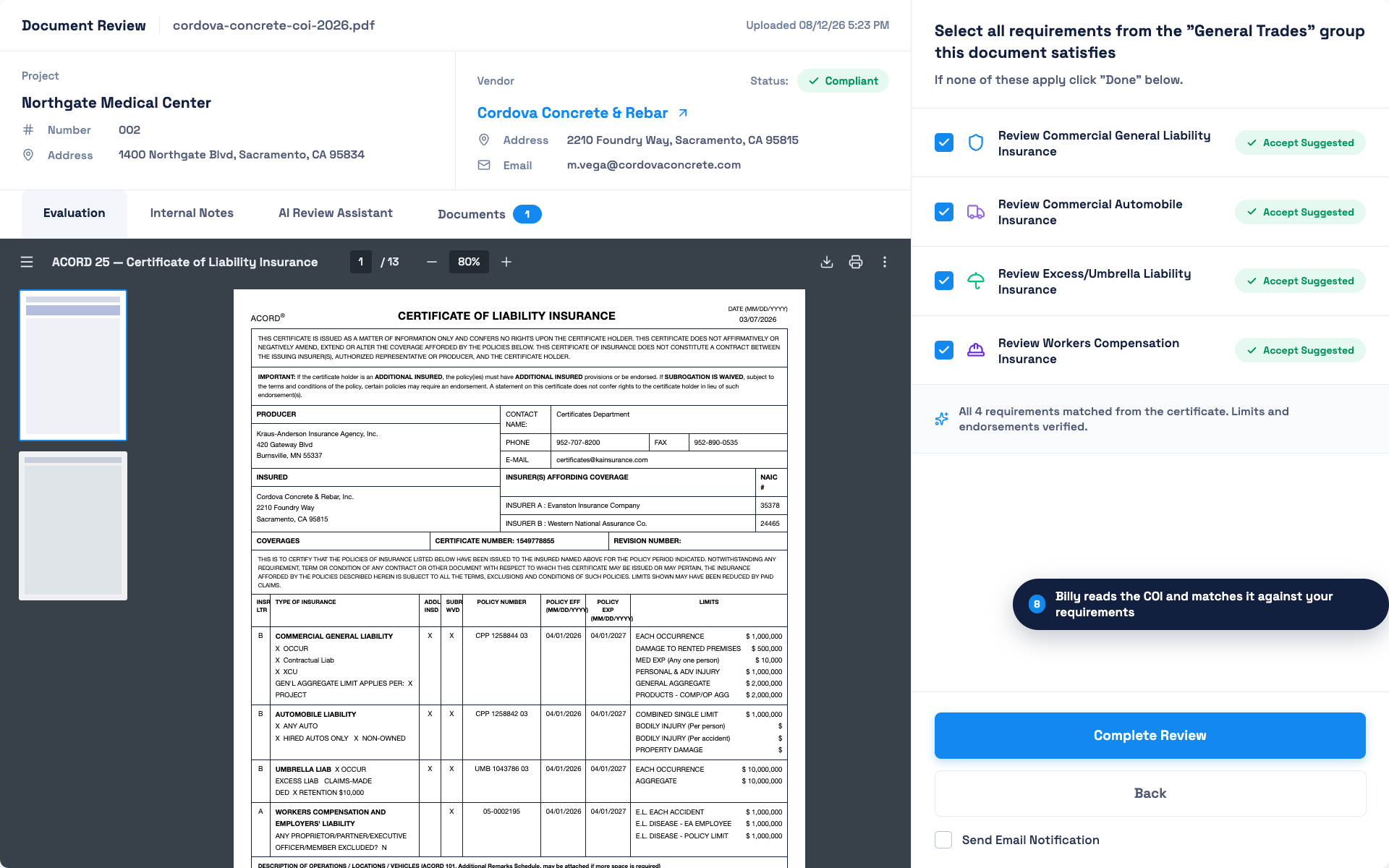
For GCs who prefer not to review certificates in-house, Billy’s Managed Plan puts licensed insurance professionals on the review.
Because Billy connects to both platforms, it also solves a common problem for GCs in transition, or those running Procore in one region and ProjectSight in another: compliance is standardized in one system even when project management is not. That is the core idea behind the connected construction compliance workflow.
Which should you choose?
If your evaluation is primarily about cost management and ERP connectivity, and you are in the Trimble ecosystem, ProjectSight is a strong fit. If you want more native prequalification and a larger app marketplace, Procore has the edge. On subcontractor insurance compliance specifically, the platforms are closer than they appear, and the decision that matters more is whether you add a verification layer on top of either one.
Frequently asked questions
Does Procore verify certificates of insurance?
Procore stores insurance information and expiration dates on the company record and alerts on approaching dates, but the data is entered manually. It does not read certificates or compare coverage to contract requirements. COI tracking integrations such as Billy add that capability.
Does Trimble ProjectSight track certificates of insurance?
ProjectSight can store COI documents against a contract record and hold expiration dates in custom fields, but it does not read certificates, verify endorsements or send renewal requests. See how to track COIs in ProjectSight.
Does ProjectSight have a subcontractor prequalification tool?
Not as a native module. Prequalification in ProjectSight is typically handled through custom forms and attached documents, or through a connected compliance platform such as Billy’s Prequalification Tool.
Can Billy work with both ProjectSight and Procore at the same time?
Yes. Billy integrates with Trimble ProjectSight, Procore and Autodesk Construction Cloud, so a GC using more than one platform can run compliance from a single system.
What documents can be tracked besides COIs?
W-9s, business and contractor licenses, master service agreements, surety bonds, lien waivers, certified payroll, safety documents and warranties, each with its own requirements and expiration logic.
Running ProjectSight or Procore and still tracking COIs by hand?
See how Billy connects to either platform in minutes.
Request a demo