
Subcontractor prequalification
Subcontractor Prequalification Software
Prequalify subs on your own form, set financial limits before you award work, and keep their insurance compliant after, all in one record that syncs to Procore and your accounting system.
Why general contractors pick Billy
Six reasons to choose Billy for subcontractor prequalification
One record from prequal to payment
Prequalification, COI tracking and payment holds share one vendor record. No second tool, no re-keying, no gaps between approval and the first check.
Your form, your criteria
Run prequal on your own website with your own questions and decision statuses: qualified, qualified with exceptions, benched or rejected.
Underwriting-grade financials
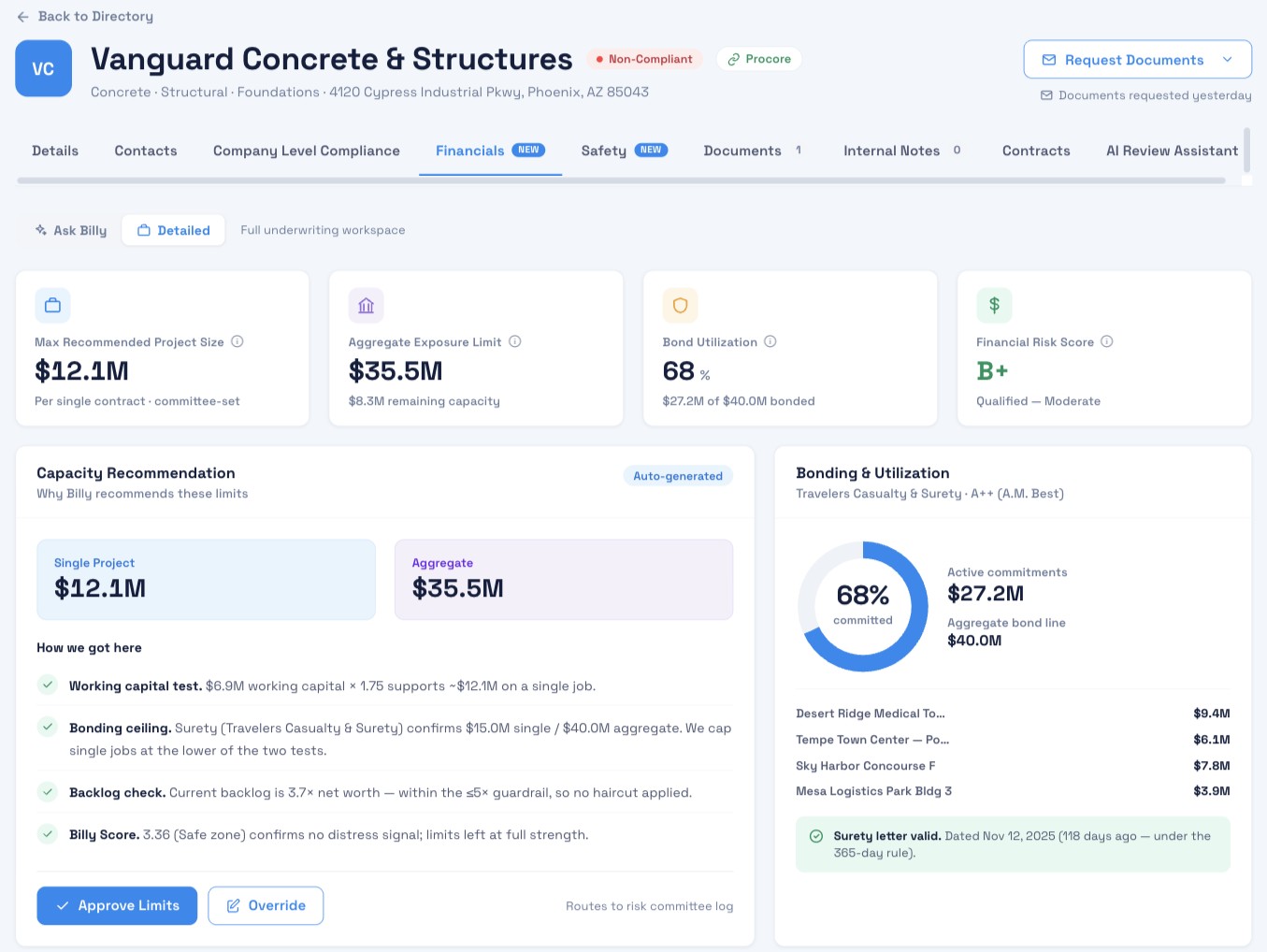
Billy recommends a max single project size and aggregate exposure limit, and shows the math behind them. Approvals and overrides are logged.
Built for Procore
Approved subs sync to the Procore company directory, and PMs see live compliance in the Billy side panel without leaving Procore.
Free and simple for subs
Subs apply on your site with no account, no login and no fee, so you get complete submissions faster.
Support that picks up
Rated 4.9 out of 5 for customer service on Capterra, with a managed plan if you want Billy’s team to run compliance for you.
How it works
How does Billy’s subcontractor prequalification software work?
Five steps, from your website to Procore.
STEP 1
Embed your form
Billy gives you code for a custom form on your website
STEP 2
Subs apply
Business details, compliance info and documents in one form
STEP 3
Get alerted
Every submission emails your team and lands in Billy
STEP 4
Approve or bench
Approve, reject or save for later, and assign requirements
STEP 5
Sync to Procore
Approved subs sync to the company level in Procore
Checklist
What should a subcontractor prequalification form collect?
Everything you need for an award decision, in one submission. Billy’s form collects all seven.
Identity
Business details
Who you’re contracting with
Identity
W-9
Needed to pay the sub and file 1099s
Compliance
Licenses
Licensed for the trade and location
Compliance
Certificate of insurance
Coverage types, limits and dates
Compliance
Safety forms
The sub’s safety program and policies
Financial
Financials
Financial strength for the job
Financial
Bonding capacity
Can be bonded for the contract size
One submission
All seven arrive together in your Billy dashboard
Need help with the paperwork? Try our free W-9 generator, learn how to review a COI, or grab the 2026 audit-ready checklist.
Financial underwriting
How do you check a subcontractor’s financial and bonding capacity?
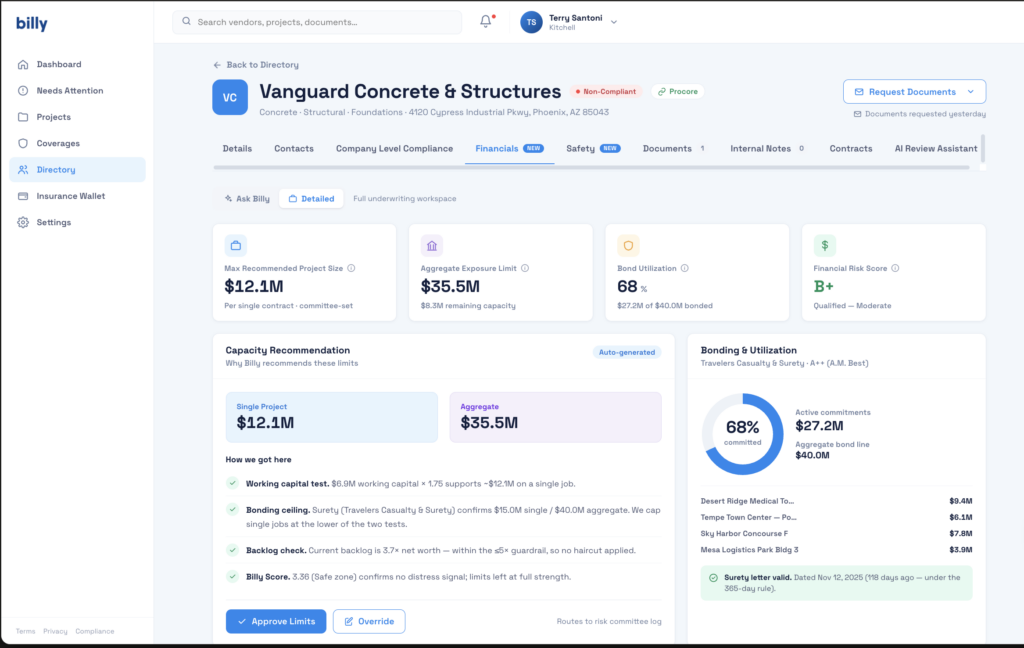
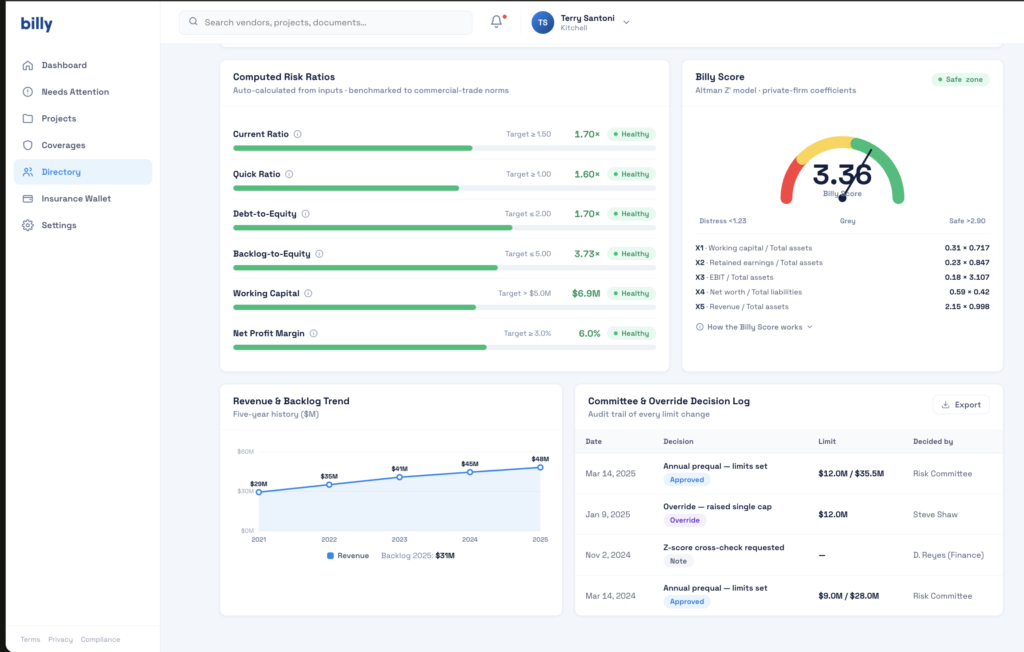
Billy’s Financials tab turns a sub’s financials and surety letter into recommended limits: the biggest single job they should take on, and the most total work they should carry at once. You see the numbers and the reasoning before you award work.
Working capital
Sets how big a single job the sub can carry
Surety bonding line
Single and aggregate limits from the surety letter
Backlog
Checked against net worth before limits are set
Billy Score
Flags signs of financial distress
Capacity recommendation
- Max single project size
- Aggregate exposure limit
- Bond utilization
- Financial risk score
Approve or override, logged for your risk committee
Once a sub is working, Billy keeps checking. It tracks contracted exposure against the approved limits, using contract values synced from Procore or JD Edwards, and flags when a surety letter is too old to rely on.
Customer reviews
What general contractors say about Billy
It has reduced the number emails regarding insurance by at least 90%.
The amount of hours spent by our admin staff on insurance compliance and chasing has been cut by more than 1/2.
Billy is easy to use, on the user end as well as the subcontractor end.
You don’t need a log in/ user to upload insurance, it’s synced with our construction platform (Procore)
Super easy to implement, use, monitor!
Billy has asked for our feedback and implemented many changes based on our suggestions.
Verified reviews from Billy on Capterra. 4.7 out of 5 from 31 reviews.
Compare
Billy vs TradeTapp vs COMPASS
TradeTapp (from Autodesk) and COMPASS (from Bespoke Metrics) are strong prequalification tools. The difference is what happens after a sub is approved. Billy keeps going: it tracks the sub’s insurance on every project and can hold payment when they fall out of compliance.
| Billy | TradeTapp | COMPASS | |
|---|---|---|---|
| Prequal form | Your own form and criteria, on your website | Custom questionnaires | Standard 1Form shared across contractors |
| Financial limits | Recommended single and aggregate limits, with the reasoning shown | Limit calculations and financial ratios | A Q Score for overall risk |
| COI and insurance tracking | Built in, per project, with AI document review | Not listed as a feature | Prequalification only; COI tracking not listed |
| Procore | Company-level sync and the Billy side panel | Syncs to BuildingConnected Pro and Forma Build; Procore not listed | Integration for prequal data |
| Accounting and payment | Compliance status syncs to Sage Intacct, Vista, Sage 300 and CMiC, so non-compliant subs are flagged before the check run | ERP backlog data flows into TradeTapp | ERP integration for prequal data |
| Cost to subcontractors | Free, no account needed | Not published | Cost “shared across the supply chain” |
Based on public information as of October 2026: the TradeTapp product page, ASA's COMPASS overview, the ConstructConnect announcement and our Billy vs COMPASS review. Product features change; confirm details with each vendor.
When TradeTapp or COMPASS might fit better
Want the full breakdown? Read Billy vs COMPASS by Bespoke Metrics or Billy vs ISNetworld vs Avetta.
Integrations
Does subcontractor prequalification work with Procore?
Yes. Approved subs sync to the company level in Procore with no duplicate entry, and PMs see compliance in the Billy side panel.
Your website
Subs apply through your prequal form
Billy
- Collect documents
- Score and approve
- Track compliance
Procore
Company-level vendor sync and the Billy side panel
Accounting and ERP
See each integration: Sage Intacct, Sage 300, Viewpoint Vista, CMiC, Acumatica, Oracle JD Edwards, Autodesk and Trimble ProjectSight.
See it in action
Watch subcontractor prequalification in Procore
Our October 2026 webinar demos prequalification, financial scoring and the Procore sync live. Get the slides in the full webinar recap.
Who it’s for
Who uses subcontractor prequalification software?
A consistent way to vet every sub before award
Project managers
Subs confirmed compliant before they reach the jobsite
Compliance and risk teams
Every document and decision in one place, ready for audits
One simple form to apply, with no extra login
The basics
What is subcontractor prequalification?
Subcontractor prequalification means vetting a sub’s insurance, licenses, safety record and financial strength before you award them work. Done up front, it lets you verify compliance before work starts, hire only properly insured subs, and cut the admin time spent chasing documents by email.
FAQ
Frequently asked questions
What is subcontractor prequalification software?
Subcontractor prequalification software collects and reviews a subcontractor’s insurance, licenses, safety forms and financials before a general contractor awards work. Billy embeds the prequalification form on your website, recommends financial limits, and syncs approved subcontractors to Procore.
How is Billy different from TradeTapp?
Both prequalify subcontractors and analyze financials. Billy also tracks certificates of insurance and project compliance after approval, syncs with Procore, and syncs compliance status to accounting systems like Sage Intacct and Viewpoint Vista so non-compliant subs are caught before payment. TradeTapp’s product page lists sync to BuildingConnected Pro and Forma Build.
How is Billy different from COMPASS?
COMPASS uses a standard 1Form shared across contractors and produces a Q Score. Billy lets you use your own form and criteria, recommends single and aggregate limits with the reasoning shown, and tracks insurance compliance in the same record.
Is Billy free for subcontractors?
Yes. Subcontractors fill out your prequalification form and upload documents without creating an account or paying a fee.
Can I put a prequalification form on my own website?
Yes. Billy provides code to embed a custom prequalification form on your website, so subcontractors apply on your site and submissions go straight into Billy.
Does Billy prequalification work with Procore?
Yes. Approved subcontractors sync to the company level in Procore, and compliance status shows in the Billy side panel inside Procore.
Can Billy check a subcontractor’s bonding capacity?
Yes. Billy’s Financials tab uses the sub’s working capital, surety bonding line, backlog and Billy Score to recommend a max single project size and an aggregate exposure limit. It also tracks bond utilization and contracted exposure against those limits.
What happens after I approve a subcontractor?
You assign the subcontractor a requirement group, and Billy tracks their insurance, W-9s, licenses and endorsements company-wide. Approved vendors also sync to Procore.
Prequalify your next sub with Billy
See your prequal form, financial limits and Procore sync on your own vendors. Already a Billy user? Log in to your Billy dashboard to set up your form.
Stop managing compliance. Start mastering it.