Key takeaways
- The ACORD 25 is a standardized certificate showing that liability coverage existed when the certificate was issued.
- The certificate summarizes coverage. It is not the insurance policy, and it grants no coverage or contractual rights by itself.
- Certificate holder status does not make you an additional insured. Additional insured status must come from the policy or an endorsement.
- Verify policy dates, limits, and coverage boxes against the contract, then review the underlying endorsements for additional insured status and waiver of subrogation.
What an ACORD 25 actually is
An ACORD 25 is a standardized certificate of insurance that summarizes a business’s liability insurance on the date the certificate was issued. ACORD develops insurance forms and data standards, but it is not an insurer. It does not sell policies, verify that every entry is accurate, or pay claims.
The certificate provides evidence of coverage rather than coverage itself. Policy language and endorsements determine who receives protection, which operations qualify, what exclusions apply, and how an insurer handles a claim. A checked additional insured box does not amend the policy or replace the corresponding endorsement. The certificate holder also gains no policy rights merely by receiving the form.
General contractors should treat the ACORD 25 as a starting point for review. The form offers a snapshot of carriers, policy numbers, dates, coverage types, and limits. It may omit relevant conditions or endorsements, and a policy can change or lapse after issuance.
The coverages grid also identifies liability coverage as occurrence or claims-made. Occurrence coverage generally depends on when the injury or damage happened. Claims-made coverage generally depends on when the claim was made and reported. That distinction affects coverage after a policy expires and whether extended reporting coverage is needed.
Box-by-box walkthrough of the ACORD 25
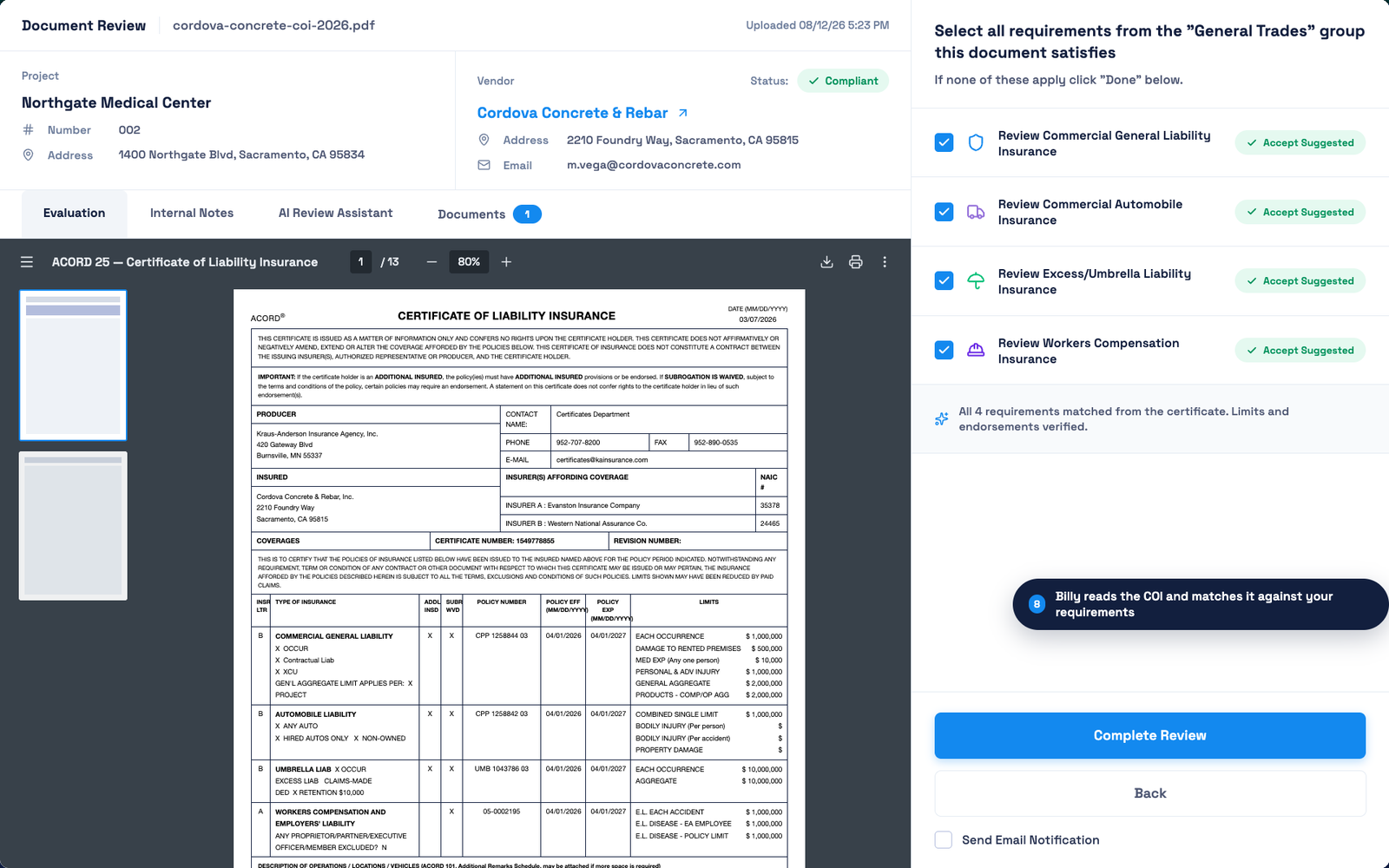
The walkthrough follows the form’s layout: parties and insurers first, then the coverage grid, then the description, certificate holder, and cancellation fields.
Producer, insured, and insurer information
The producer block identifies the insurance broker or agency that issued the certificate. Confirm the agency name, address, contact person, phone number, and email. Contact the producer directly when policy details look inconsistent or when you need endorsements. Use contact information obtained independently if you suspect the certificate was altered.
The insured block should show the subcontractor’s full legal business name and mailing address. Compare the name with the subcontract, W-9, and state business registration. An owner’s personal name, an incomplete trade name, or a related company may indicate that the policy covers a different entity. The named insured should be the business entity performing the contracted work.
The insurer section lists carriers as Insurer A through Insurer F. Each letter connects a carrier to one or more rows in the coverage grid. Review the carrier name and its NAIC number, which lets you verify the insurer through state insurance records. A carrier name without a valid NAIC number requires follow-up.
The certificate number helps you track submissions and revisions. A new number does not prove that coverage changed, so compare every revised certificate with the earlier version.
The coverages grid: general liability, auto, umbrella, workers’ comp
The coverages grid shows which insurer backs each policy, when coverage applies, and how much the carrier may pay. Match the insurer letter, policy number, effective date, and expiration date on every required line. A subcontractor fails the date check when its policy expires before its work ends, even if the policy is active today.
Commercial general liability. The each-occurrence limit caps payment for one covered event. The general aggregate caps payment across covered claims during the policy period. Confirm whether the aggregate applies per policy, project, or location, because an endorsement usually controls that. The products and completed operations aggregate applies to claims tied to finished work. A contract requiring $1 million per occurrence and $2 million aggregate does not accept $1 million for both.
Automobile liability. The grid identifies coverage for any auto or narrower groups such as owned, hired, and non-owned autos. A subcontractor with only hired and non-owned coverage fails an “any auto” requirement when company-owned vehicles will enter the project.
Umbrella or excess liability. Review both the each-occurrence and aggregate limits, then confirm the umbrella sits over the general liability, auto, and employers’ liability policies the contract requires. A $4 million umbrella paired with $1 million general liability may satisfy a $5 million total requirement, but only when the umbrella follows that underlying coverage.
Workers’ compensation. The form should show statutory coverage for the states where work occurs. Employers’ liability uses three limits: each accident, disease per employee, and disease policy limit. Compare each one with the contract. Also check whether proprietors, partners, or officers are excluded.
ADDL INSD and SUBR WVD boxes. These apply separately to each coverage line. A checked box indicates an endorsement may exist. Neither checkmark proves it does, so request the endorsement itself.
Description of operations, certificate holder, and cancellation
The description of operations should identify the subcontractor’s work, project, and location in enough detail to match the contract. Vague language or the wrong project name warrants follow-up. Free-text wording cannot add coverage that the policy and endorsements do not provide.
The certificate holder box only names the party receiving proof of insurance. It grants no policy rights, defense, or indemnity. Listing your company as certificate holder does not satisfy a contractual additional insured requirement, even if the description names your project.
The cancellation block states that notice will be handled under the policy’s terms. Standard wording does not guarantee the certificate holder a specific number of days’ notice. If your contract requires notice, review the cancellation endorsement. Finally, confirm that an authorized representative signed the form.
The GC review checklist: what to verify before accepting a certificate
Review each certificate against the subcontract or insurance exhibit. A complete ACORD 25 can still fail the project’s requirements.
- Match the named insured to the legal entity in the contract.
- Confirm the policy periods cover the subcontractor’s full work period. For claims-made coverage, check whether the contract requires tail coverage.
- Compare each limit with the contract, line by line. Do not assume an umbrella cures every shortfall.
- Check policy numbers and carriers. Match each insurer letter to its carrier and NAIC number.
- Review the additional insured boxes for each policy that must cover the GC or owner.
- Review the waiver of subrogation boxes for every required line.
- Read the description of operations. Watch for limiting phrases such as “when required by written contract” and references to exclusions.
- Verify the certificate holder name and address. Treat it as proof of delivery only.
- Request and review the endorsements: additional insured, primary and non-contributory, and waiver of subrogation. Compare names, policy numbers, and dates with the certificate before approving.
Why the certificate alone isn’t enough
An ACORD 25 summarizes coverage but does not create or amend it. The additional insured box can show “Y” even when the policy lacks the required endorsement or when the endorsement does not apply to your project.
The insurer relies on the policy and endorsements when a claim occurs. If the subcontractor’s policy does not grant additional insured status to the general contractor, the insurer may deny defense or indemnity regardless of what the certificate says.
Review each endorsement for scope and conditions. An additional insured endorsement may cover ongoing operations but exclude completed operations. That is the difference between CG 20 10 and CG 20 37. A waiver of subrogation may apply to general liability but not workers’ compensation. Primary and non-contributory wording should confirm that the subcontractor’s policy responds before yours.
Common mistakes and fraud red flags
Treat clerical mistakes as correction requests and fraud indicators as reasons for independent verification.
Clerical errors
- The named insured shows an owner’s personal name instead of the legal business entity.
- The policy number differs from the declarations page or endorsement.
- Effective and expiration dates conflict across lines or fall outside the work period.
- Limits, coverage types, or insurer details were copied incorrectly.
- The GC is named as certificate holder, but additional insured status is not documented.
Fraud red flags
- Fonts, spacing, logos, or text quality change within the PDF.
- An expired or canceled policy is presented as active, especially when dates look altered.
- The insurer name, NAIC number, or producer contact cannot be verified independently.
- The person who signed lacks authority from the broker or carrier.
- The subcontractor resists providing endorsements or producer confirmation.
The response is the same for both. Compare the ACORD 25 with the endorsements and call the producer through independently verified contact information. Do not accept the PDF alone.
How Billy automates ACORD 25 review

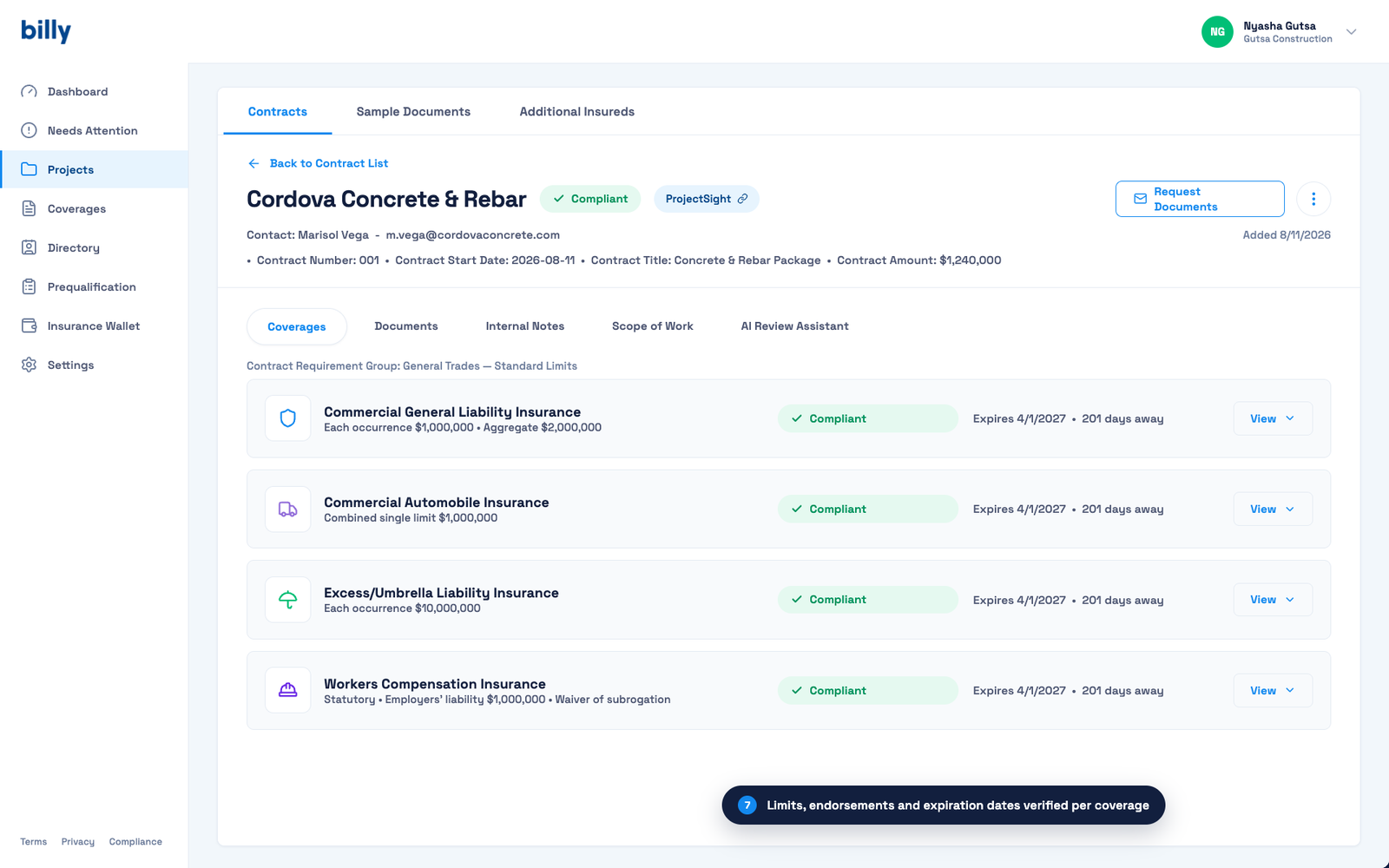
Billy’s AI Review Assistant checks each ACORD 25 field against the insurance requirements for that project: named insured, policy dates, limits, additional insured and waiver indicators, description of operations, and certificate holder.
Billy also reviews the supporting endorsements, which catches certificates that check the additional insured box without the endorsement behind it. When something falls short, Billy identifies the specific mismatch so you can request a correction instead of rereading the whole package.
If you run projects in Trimble ProjectSight, Billy’s ProjectSight integration imports your projects, contracts, and vendors so requirements apply per project.
Tracking by hand today? Start with the free COI tracking template. Request a Billy demo to see automated ACORD 25 review against your own contract requirements.
Frequently asked questions
What is the difference between ACORD 25 and ACORD 27 or 28?
ACORD 25 provides evidence of liability insurance, including general liability, auto, umbrella, and workers’ compensation. ACORD 27 and 28 provide evidence of property coverage.
How long is a certificate of insurance valid?
A certificate reflects coverage on its issue date and lists each policy’s effective and expiration dates. Confirm that every required policy remains active before work begins and request an updated certificate at each renewal.
Can an ACORD 25 be faked?
Yes. Someone can alter a PDF, enter false policy information, or present a certificate for canceled coverage. Verify questionable certificates by contacting the producer through independently confirmed contact information and requesting the endorsements.
What should I do if a subcontractor will not provide endorsements?
Do not treat the certificate as proof that additional insured, primary and non-contributory, or waiver terms apply. Follow your contract’s compliance process before allowing work to proceed.
Are the certificate holder and additional insured the same?
No. A certificate holder receives evidence of insurance but gains no policy rights. An additional insured may receive defense and indemnity under an applicable endorsement.
See it on your own vendors and projects.
Request a demo