Billy vs. myCOI: Which COI Compliance Platform Is Right for You?
An honest, feature-by-feature comparison for general contractors, developers, and risk managers evaluating construction compliance software in 2026.
Choose Billy if you’re a construction company that lives in Procore, Autodesk, or a construction ERP, need real workflow enforcement, and want subcontractor prequalification unified with compliance. Choose myCOI if you’re an insurance agency/broker, a property manager, or a company that needs general-purpose COI tracking outside of AEC.
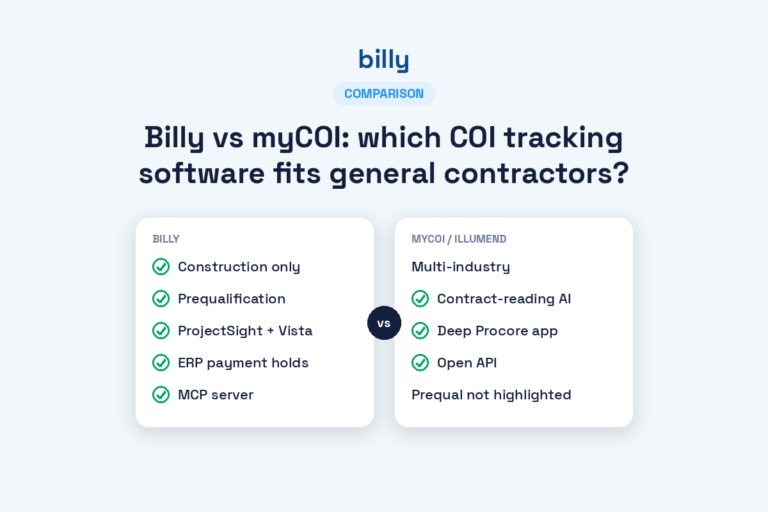
At a Glance: Billy vs. myCOI
Billy Construction-Native
- Built specifically for construction compliance
- Deep Procore, Autodesk, Sage 300, Viewpoint, Acumatica sync
- DocuSign-powered hold harmless and W9 collection
- Built-in subcontractor prequalification workflow
- Prequalification integrates directly into Procore & Autodesk
- AI Review Assistant for COI verification
- Self-service or managed options
myCOI Established COI Tracker
- Long track record in COI tracking since 2009
- Strong presence with insurance brokers and agencies
- Multi-industry focus (construction, property, manufacturing)
- Managed verification services
- Broader industry reach outside AEC
- Established reputation in the insurance channel
Feature-by-Feature Comparison
| Capability | Billy | myCOI |
|---|---|---|
| Construction-specific workflows | ✓ Purpose-built for AEC | ◐ Multi-industry |
| Procore integration depth | ✓ Native + Side Panel | ◐ Available, less deep |
| Autodesk Construction Cloud | ✓ Native integration | ✗ Limited/none |
| Construction ERP sync (Sage 300, Intacct, Viewpoint, Acumatica, JD Edwards, CMiC) | ✓ Broad native support | ◐ Select integrations |
| Hold harmless / indemnity tracking | ✓ DocuSign-enforced | ◐ Field-based |
| Subcontractor prequalification workflow | ✓ Built-in, end-to-end | ✗ Not offered |
| Prequalification integrated with Procore & Autodesk | ✓ Native | ✗ Not offered |
| AI-powered COI review | ✓ AI Review Assistant | ◐ Manual/human-led |
| Managed services option | ✓ Available | ✓ Core offering |
| Self-service option | ✓ Available | ◐ Less emphasized |
| Insurance broker/agency partnerships | ◐ Growing | ✓ Long-established |
| Non-construction industries | ◐ AEC-focused | ✓ Broader reach |
| Project-level compliance control | ✓ Native | ◐ Limited |
How to read this table: ✓ native/strong capability · ◐ supported but limited · ✗ not available or not a focus. Both platforms continue to evolve — confirm current capabilities directly with each vendor before making a final decision.
Where Billy Wins
1. Deeper construction ecosystem integrations
Billy was designed from day one for the tools general contractors actually use. Native Procore integration (including the Procore Side Panel), Autodesk Construction Cloud, CMiC, Sage 300, Sage Intacct, Viewpoint Vista, JD Edwards, and Acumatica mean compliance status flows directly into project and financial workflows — no manual re-keying, no status gaps.
2. Enforceable document workflows, not checklists
Billy treats compliance documents as enforceable artifacts. Native DocuSign integration means hold harmless agreements, W9s, and other documents are actually collected, signed, and stored — not just noted as “required.” Non-compliant vendors can be blocked from starting work or receiving payment.
3. A full subcontractor prequalification workflow — something myCOI doesn’t offer
This is one of the biggest functional gaps between the two platforms. myCOI does not offer a subcontractor prequalification workflow. Billy does — and it’s not a bolt-on, it’s a first-class product integrated into the same platform as your COI and compliance tracking.
Billy’s subcontractor prequalification lets you:
- Vet subcontractors before they’re awarded work — financials, safety records, experience, references, licensing, bonding capacity
- Standardize qualification packages across projects and business units
- Automate data collection — subs fill out qualification forms directly, no more chasing PDFs over email
- Re-qualify annually with automated reminders and expiration tracking
- Score and compare subs using consistent criteria
The integration advantage: Billy’s prequalification workflow pushes directly into Procore and Autodesk Construction Cloud. Prequalification status, financial data, safety records, and compliance documents all flow into the same project and vendor records your team already uses. That means project managers see prequalification status without leaving Procore, and you’re not maintaining two separate databases of vendor information.
If you’re using myCOI today, prequalification is a separate process run in spreadsheets, PDFs, email threads, or a third tool. With Billy, it’s one workflow — compliance and prequalification on the same vendor record, syncing into the same project systems.
4. AI Review Assistant
Billy’s AI Review Assistant automates COI verification — reading endorsements, flagging gaps, and accelerating approvals. This is a newer capability set than what most legacy COI platforms offer.
Where myCOI Wins (Being Honest)
No comparison is useful if it’s one-sided. Here’s where myCOI genuinely has an edge:
1. Longer track record
myCOI has been in the market since 2009, which means more years of refinement, a larger installed base, and a deeper bench of case studies across industries. For risk-averse buyers, longevity matters.
2. Insurance broker and agency reach
myCOI has deep roots in the insurance agency channel. If your compliance process is heavily tied to your insurance broker’s workflow, or if your broker recommends myCOI, integration with that relationship may be smoother.
3. Multi-industry flexibility
If your organization needs COI tracking across construction, property management, manufacturing, and staffing — all in one tool — myCOI’s broader industry focus may fit better than Billy’s AEC-first design.
4. Established managed services model
Managed verification has been core to myCOI’s model for years. Billy offers managed services too, but myCOI’s operational muscle in this area is well-developed.
The honest takeaway: These platforms are built for overlapping but different buyers. Billy is optimized for construction companies that want compliance embedded into their tech stack. myCOI is optimized for broader COI tracking with strong broker-channel relationships. Neither is universally “better” — the right choice depends on what you’re actually trying to solve.
Pricing Posture
Both Billy and myCOI use consultative pricing rather than public price lists. Expect pricing to depend on:
- Vendor volume — number of subs, suppliers, or vendors tracked
- Service level — self-service vs. managed verification
- Integration scope — Procore, ERP, DocuSign, etc.
- Feature tier — prequalification, AI review, advanced workflows
General positioning:
- Billy tends to land competitively for mid-market construction firms, especially when you factor in bundled integrations (Procore + ERP + DocuSign) that would otherwise require add-ons or separate tools.
- myCOI pricing is typically aligned with its managed-services positioning, which can be attractive for teams that want to outsource more of the verification work.
Recommendation: Get quotes from both, and make sure they include the same scope (integrations, vendor count, service level). Apples-to-apples comparison is harder than it looks.
Integrations Compared
| System | Billy | myCOI |
|---|---|---|
| Procore | ✓ Native + Side Panel | ◐ Available |
| Autodesk Construction Cloud | ✓ Native | ✗ |
| DocuSign | ✓ Native | ◐ Limited |
| CMiC | ✓ Native | ✗ |
| Sage 300 CRE | ✓ Native | ◐ Varies |
| Sage Intacct | ✓ Native | ◐ Varies |
| Viewpoint Vista | ✓ Native | ✗ |
| JD Edwards | ✓ Native | ✗ |
| Acumatica | ✓ Native | ✗ |
Who Should Choose Billy?
Billy is the right fit if you’re…
- A general contractor running Procore, Autodesk, or a construction ERP like Sage 300 or Viewpoint
- Managing hold harmless agreements and want real DocuSign-backed enforcement
- Running subcontractor prequalification and want it unified with compliance — and pushed into Procore and Autodesk
- Looking to reduce manual COI review with AI-assisted verification
- A developer or owner-builder who wants compliance embedded in project workflows
- Mid-market or enterprise construction firm with 50+ active vendors
Who Should Choose myCOI?
myCOI is the right fit if you’re…
- An insurance agency or broker offering COI tracking as a value-add to clients
- Operating outside construction (property management, manufacturing, staffing)
- Prioritizing a deeply managed services model over self-service
- Already integrated with myCOI through your insurance channel
- Tracking COIs across a mix of industries where AEC isn’t dominant
Migrating from myCOI to Billy
If you’ve decided Billy is a better fit, migration is straightforward. Most customers complete the move in 2–6 weeks depending on vendor volume.
What migration typically looks like
- Data export from myCOI — vendor records, active COIs, endorsements, historical documents
- Requirement mapping — translating myCOI requirement groups into Billy’s workflow structure
- Bulk import into Billy — vendors, documents, and project assignments
- Integration setup — connecting Procore, Autodesk, your ERP (Sage 300, Sage Intacct, Viewpoint, Acumatica), and DocuSign
- Team training — usually a short session for self-service users; managed customers get white-glove handoff
- Parallel run (optional) — some teams run both systems for 2–4 weeks during cutover
Billy’s customer success team handles the heavy lifting. You shouldn’t need to manually re-enter vendor data or recreate compliance logic from scratch.
Frequently Asked Questions
What is the difference between Billy and myCOI?
Billy is a construction-native compliance platform with deep integrations into Procore, Autodesk, Sage, Viewpoint, and Acumatica. myCOI is an established COI tracking platform that began serving insurance agencies and expanded into end-client tracking. Billy is generally a better fit for general contractors on a modern construction tech stack; myCOI is often chosen by insurance brokers and companies outside AEC.
Is Billy cheaper than myCOI?
Pricing varies by company size, vendor count, and service level. Billy typically positions competitively for mid-market construction companies because of bundled integrations and prequalification. For an accurate comparison, request pricing from both with identical scope.
Can Billy replace myCOI?
Yes. Billy supports migration from myCOI with bulk vendor imports, document migration, and guided onboarding. Most migrations complete in 2–6 weeks.
Does Billy integrate with Procore better than myCOI?
Billy offers a deeper, construction-native Procore integration including bidirectional project and vendor sync, a Procore Side Panel, and compliance status pushed directly into project workflows. myCOI offers Procore integration but with more limited workflow depth.
Which is better for hold harmless agreements?
Billy is generally stronger. It treats hold harmless agreements as enforceable, document-backed requirements collected via DocuSign. myCOI supports hold harmless as a requirement field but with less document workflow depth. See our full hold harmless tracking guide.
Does myCOI have any advantages over Billy?
Yes. myCOI has a longer market track record, a stronger presence among insurance agencies and brokers, and deeper experience in industries outside construction like property management and manufacturing. Companies tied to insurance broker workflows or operating outside AEC may find myCOI a better fit.
Does myCOI have a subcontractor prequalification workflow?
No. myCOI does not offer a built-in subcontractor prequalification workflow. Billy’s prequalification is a full end-to-end workflow integrated with Procore and Autodesk Construction Cloud, letting you vet, qualify, and onboard subcontractors inside the same platform as COI and compliance tracking.
Can I run subcontractor prequalification inside Procore or Autodesk with Billy?
Yes. Billy’s prequalification workflow is natively integrated with Procore and Autodesk Construction Cloud. Prequalification status, financial data, safety records, and compliance documents flow into the same project and vendor records your team already uses — eliminating duplicate data entry and siloed vetting processes.
How long does it take to switch from myCOI to Billy?
Most migrations complete in 2–6 weeks. The timeline depends on vendor volume, integration complexity, and whether you want a parallel-run period during cutover.
See Billy in Your Environment
The best way to evaluate compliance software is to see it running on your actual project and vendor data. Book a demo and we’ll walk through your specific use case — including how subcontractor prequalification integrates into your Procore or Autodesk workflow.
Request a Demo See Billy Overview