Construction Compliance Guide
The GC’s Guide to COI Compliance on OCIP & CCIP (Wrap-Up) Projects
12 min read · Construction Compliance · Updated Feb 2026
If your firm has ever managed a wrap-up project, you already know: the COI workflow that works on a traditional job falls apart the moment you’re dealing with enrolled and non-enrolled subcontractors on the same project.
On a standard construction project, every subcontractor provides their own general liability and workers’ compensation certificates. You verify, you track, you move on. But on an OCIP (Owner-Controlled Insurance Program) or CCIP (Contractor-Controlled Insurance Program), the rules change completely. Some subs are enrolled in the wrap-up and only need to show coverage for excluded lines like commercial auto. Others are excluded from the program and need full traditional COIs. Mix that up, and you either delay mobilization or — worse — create a coverage gap that nobody catches until a claim hits.
This guide breaks down exactly how COI compliance works on wrap-up projects, what GCs need to verify for each type of sub, and how to build a tracking system that doesn’t require a PhD in insurance administration.
What Are OCIP and CCIP Programs?
A Controlled Insurance Program (CIP) — commonly called wrap-up insurance — is a consolidated insurance package that covers all (or most) contractors and subcontractors on a construction project under a single policy. Instead of 40 different subs each buying their own general liability and workers’ comp, one master policy “wraps” everyone together.
The difference between OCIP and CCIP comes down to who sponsors and controls the program:
| Feature | OCIP | CCIP |
|---|---|---|
| Sponsored by | Project Owner / Developer | General Contractor |
| Administered by | Owner’s wrap-up administrator | GC’s wrap-up administrator |
| Carrier selection | Owner selects | GC selects |
| Common on | Large public works, institutional builds | GC-led commercial projects ($25M+) |
| Typical coverages | CGL, Excess/Umbrella, Workers’ Comp | CGL, Excess/Umbrella, Workers’ Comp |
Both types typically cover commercial general liability (CGL) and excess/umbrella liability at minimum. Many also include workers’ compensation and employers’ liability. Some programs add contractor’s pollution liability, builders’ risk, or professional liability depending on the project.
Why Wrap-Up Projects Create COI Chaos
Here’s the core problem: on a wrap-up project, not every subcontractor has the same insurance obligations. You end up with two (sometimes three) distinct categories of subs, each with different COI requirements.
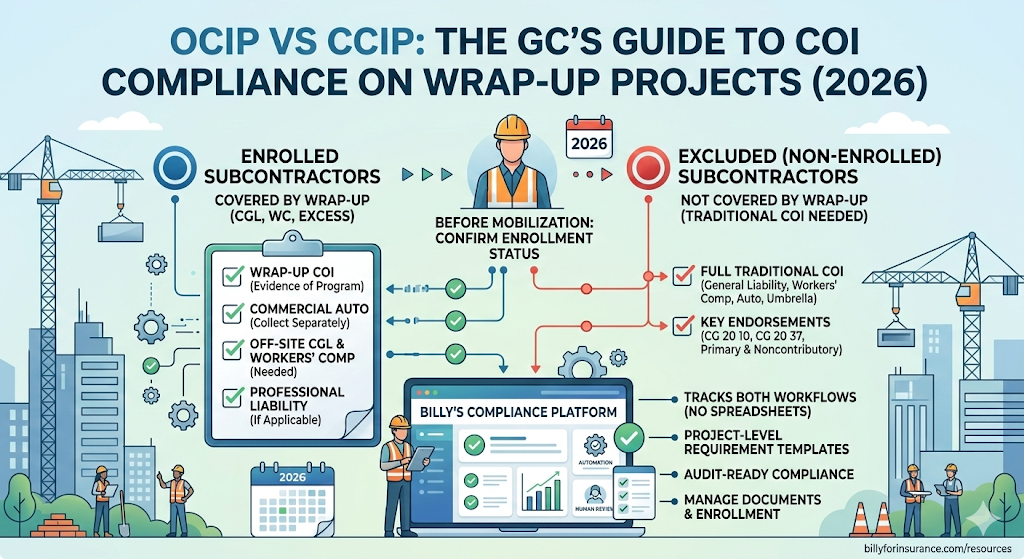
🔵 Enrolled subcontractors are covered under the wrap-up for CGL and (often) workers’ comp. They still need certificates of insurance — but only for coverages not provided by the program. Typically that means commercial auto liability, professional liability (if applicable), and evidence that they have their own CGL and workers’ comp for work performed away from the project site.
🔴 Excluded (non-enrolled) subcontractors are not covered by the wrap-up at all. These might include material suppliers, truckers and haulers, subs with very limited on-site time, or subs excluded due to high experience modification rates. They need full traditional COIs — general liability, workers’ comp, auto, umbrella — and all the standard endorsements like CG 20 10, CG 20 37, and Primary & Noncontributory.
🟡 Pending-enrollment subcontractors are the ones nobody talks about. These are subs who have been awarded a subcontract but haven’t yet been formally enrolled by the wrap-up administrator. Until enrollment is confirmed, they should be treated as non-enrolled — meaning full COI requirements apply.
✅ The Enrolled Sub COI Checklist
Even though enrolled subcontractors are covered under the wrap-up for their primary coverages, they still need to provide documentation:
| Document Required | What to Verify |
|---|---|
| Wrap-up certificate of insurance | Issued by program administrator — confirms enrollment and shows covered lines (CGL, workers’ comp, excess). Keep on file as evidence of program coverage. |
| Commercial auto liability | Auto coverage is almost never included in wrap-ups. Every enrolled sub operating vehicles on/around the project needs their own auto COI. Verify $1M CSL minimum. |
| Off-site CGL & workers’ comp | Wrap-up only covers the designated project site. If the sub fabricates materials at their shop or works at another location, that falls under their own policies. |
| Professional liability (if applicable) | For design-build subs, architects, or engineers — rarely included in wrap-ups. Collect and verify separately. |
| Contractor’s pollution liability | If CPL is excluded from the program, subs performing abatement, demolition, or environmental work need their own coverage. |
🔴 The Non-Enrolled Sub COI Checklist
Non-enrolled subs get treated just like subs on any traditional project. Your standard construction insurance compliance workflow applies in full:
| Coverage | Minimum Requirement | Key Endorsements |
|---|---|---|
| Commercial General Liability | $1M per occurrence / $2M aggregate, occurrence-based | CG 20 10, CG 20 37, Primary & Noncontributory (CG 20 01), Waiver of Subrogation (CG 24 04) |
| Workers’ Compensation | Statutory limits; EL $1M/$1M/$1M | Waiver of Subrogation; check EMR ≤ 1.0 or 1.25 |
| Commercial Auto | $1M combined single limit | Owned, hired, non-owned autos covered |
| Umbrella / Excess | $5M–$10M (project dependent) | Follow form over CGL, auto, EL |
For a deep dive on endorsements, see our endorsement guide.
Insurance Credits: The Hidden Compliance Issue
⚠️ Most COI tracking systems completely ignore this
When a sub enrolls in a wrap-up, they’re supposed to reduce their bid by the amount they would have spent on the coverages now provided by the program (the insurance credit). You need to verify that enrolled subs have actually adjusted their own policies to avoid double coverage — and double billing.
The wrap-up administrator typically handles insurance credit negotiations, but as the GC, you should confirm that each enrolled sub’s standalone COI explicitly excludes the wrap-up project site from their CGL and workers’ comp coverage territory. This is usually done via an endorsement on the sub’s own policy.
How to Track It All: The 5-Step Workflow
The fundamental challenge of wrap-up COI tracking is that you’re running two parallel compliance workflows on the same project — one for enrolled subs and one for non-enrolled subs — and a sub’s status can change over the life of the project.
Establish enrollment status before mobilization.
Before any sub sets foot on site, confirm with the wrap-up administrator whether they are enrolled, excluded, or pending. Document this status in your compliance system.
Apply the correct requirement template.
Enrolled subs get the “enrolled” checklist (auto, off-site coverage, specialty lines). Non-enrolled subs get the full traditional checklist. This is where spreadsheet-based tracking falls apart — you need a system that can apply different compliance requirement sets to different vendors on the same project.
Track enrollment changes mid-project.
Subs can be de-enrolled from a wrap-up for various reasons (EMR changes, safety violations, late reporting). If a sub gets de-enrolled, they immediately need full traditional COIs. Your tracking system needs to flag this transition and trigger a new document request.
Collect and file wrap-up certificates separately.
Wrap-up certificates look different from traditional COIs and are issued by the program administrator, not the sub’s broker. Store them alongside (not instead of) the sub’s own certificates for excluded coverages.
Audit before close-out.
At project completion, verify that all enrolled subs have maintained coverage through the completed operations period. The wrap-up’s tail (typically 3–10 years) should cover enrolled subs, but non-enrolled subs need their own CG 20 37 and completed operations coverage confirmed.
💡 How Billy handles this
Billy’s COI compliance tracking platform lets you set different insurance requirement templates per vendor per project — exactly what wrap-up projects demand. Tag vendors as “enrolled” or “non-enrolled” and the corresponding requirement set applies automatically. When enrollment status changes, requirements update and trigger new document requests via the managed services team or directly through Billy’s vendor portal. If you’re using Procore, Billy’s integration automatically syncs vendor and project data so you’re not re-entering sub information across systems.
5 Common Wrap-Up Compliance Mistakes
| Mistake | Why It’s Dangerous & How to Fix It |
|---|---|
| Treating enrolled subs as “fully covered” | Even enrolled subs need auto certificates and off-site coverage documentation. The wrap-up only covers the designated project site for designated coverage lines. |
| Letting pending-enrollment subs mobilize without any COI | Until enrollment is formally confirmed, treat them as non-enrolled. Collect full traditional COIs. You can reclassify later. |
| Not verifying the carrier on the wrap-up certificate | The carrier should be AM Best rated A- or better. If the wrap-up is placed with a non-admitted or surplus lines carrier, make sure your contract allows it. |
| Not tracking the completed operations tail | If the tail expires before a latent defect claim surfaces, the GC could be exposed. Confirm the tail period (3, 5, or 10 years) and calendar a reminder to verify it’s still in force. |
| Using one COI template for wrap-up and traditional projects | A single static template can’t accommodate different requirement sets. You need a system that supports project-level configuration — which is where dedicated COI tracking software becomes essential. |
OCIP vs. CCIP: Does It Change the GC’s Compliance Workflow?
From a pure COI tracking perspective, the workflow is essentially the same. The key differences affect who drives certain steps:
|
On an OCIP The owner’s wrap-up administrator handles enrollment, insurance credits, and wrap-up certificate issuance. The GC’s role: ensure subs are enrolled before mobilization, collect certificates for excluded coverages, and verify non-enrolled subs have full traditional COIs. Also confirm the owner has named the GC as additional insured on the OCIP policy itself. |
On a CCIP The GC handles enrollment directly — more control but also more administrative responsibility. The GC manages enrollment, coordinates insurance credits, and issues wrap-up certificates on top of tracking excluded coverages for enrolled subs and full COIs for non-enrolled subs. |
When Do Wrap-Ups Make Sense? A Quick Framework
| Project Size | Recommendation | Why |
|---|---|---|
| Over $50M hard costs | Strong OCIP candidate | Owner has experienced risk management team and enough premium volume to justify administration |
| $25M – $50M | Good CCIP candidate | GC’s construction insurance expertise can drive better outcomes than owner managing alone |
| Under $25M | Traditional insurance | Not enough premium volume to justify wrap-up administration overhead — strong COI tracking is more cost-effective |
🏗️ Get Your Wrap-Up Compliance Right
Project-level requirement templates. Vendor-specific compliance tracking. AI + human document review. Deep integrations with your construction management platform.
Request a Free Demo →📚 Related Resources
|
Guide Insurance Endorsements: CG 20 10, CG 20 37 & Primary Noncontributory → |
Guide Certificate Holder vs Additional Insured: What GCs Must Verify → |
|
Workflow |
Comparison |
|
Free Tool |
Free Tool |