If you’re a Florida GC, the best Notice to Owner (NTO) workflow is simple:
Log the NTO → link it to the correct vendor + project → confirm compliance/COI status → notify PM + accounting → preserve an audit trail.
Most lien headaches come from skipping one of those steps (or doing them in email and shared drives). Billy turns NTOs into a controlled compliance record that’s visible in Procore commitments and vendor records, so the whole team operates from a single source of truth.
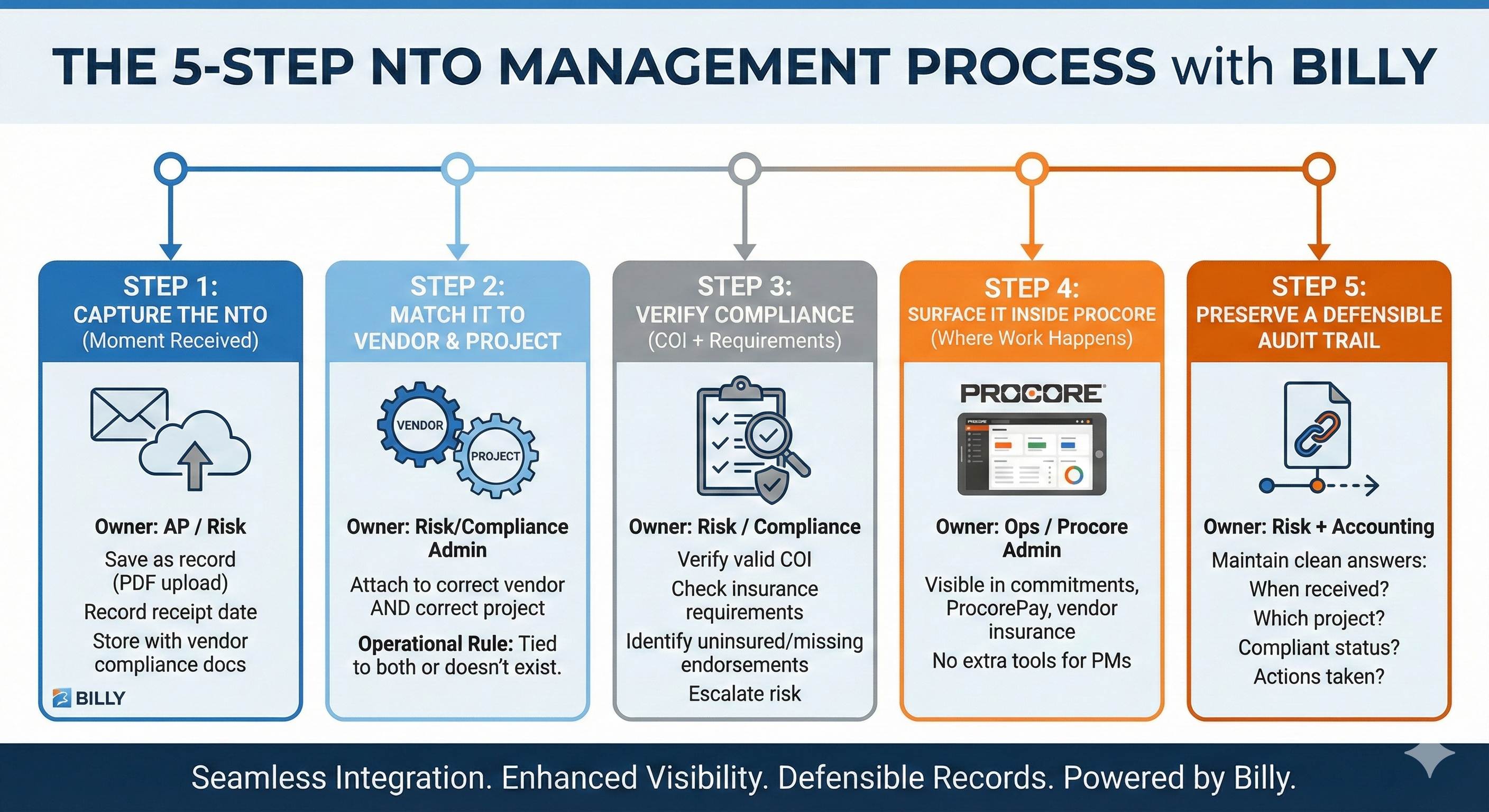
The 5-Step NTO Workflow for Florida General Contractors
Step 1: Capture the NTO the moment it’s received
Owner: AP / Risk / Contract Admin (whoever receives mail + email)
- Save the NTO as a record (PDF upload)
- Record receipt date (important later)
- Do not leave it living in an inbox thread
Billy supports storing NTOs alongside other vendor compliance docs so the record starts clean.
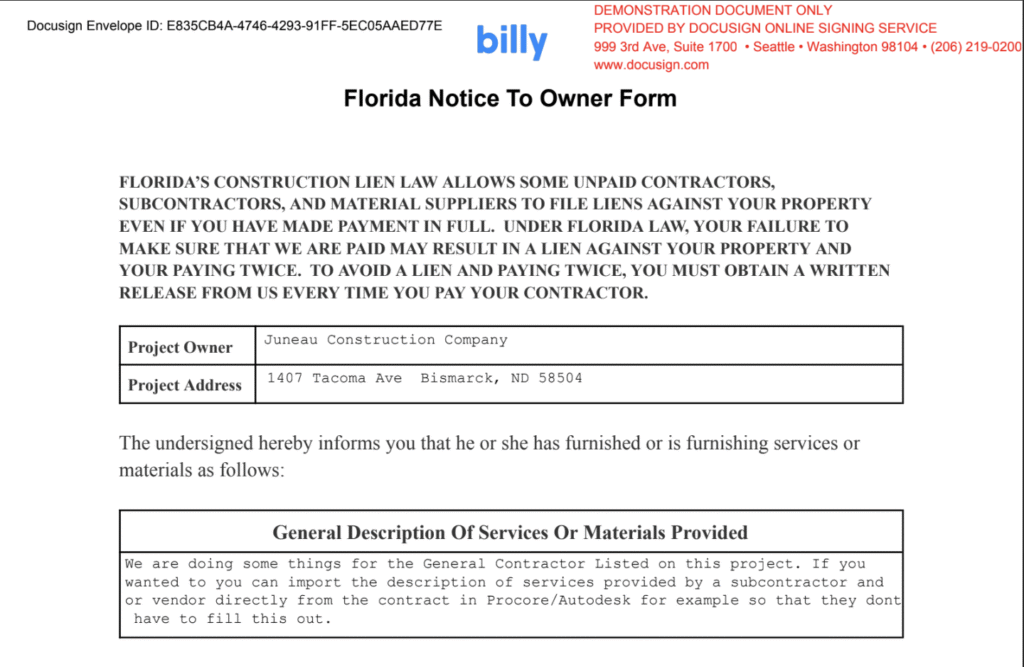
Step 2: Match it to the right vendor AND the right project
Owner: Risk/Compliance Admin (with PM confirmation if needed)
This is the most common failure point: NTOs get filed “somewhere,” but not connected to the project/accounting workflow.
- Attach the NTO to the correct vendor
- Attach the NTO to the correct project
Operational rule: If it isn’t tied to both the vendor and the project, it doesn’t exist.
Step 3: Verify whether the sender is compliant (COI + requirements)
Owner: Risk / Compliance
An NTO isn’t just paperwork; it’s a risk signal. Your team should immediately answer:
- Do they have a valid COI on file?
- Do they meet project-specific insurance requirements?
- Are there missing endorsements or under-insurance?
With Billy, you can identify uninsured/under-insured senders and missing endorsements early, then escalate risk before payment or exposure occurs.
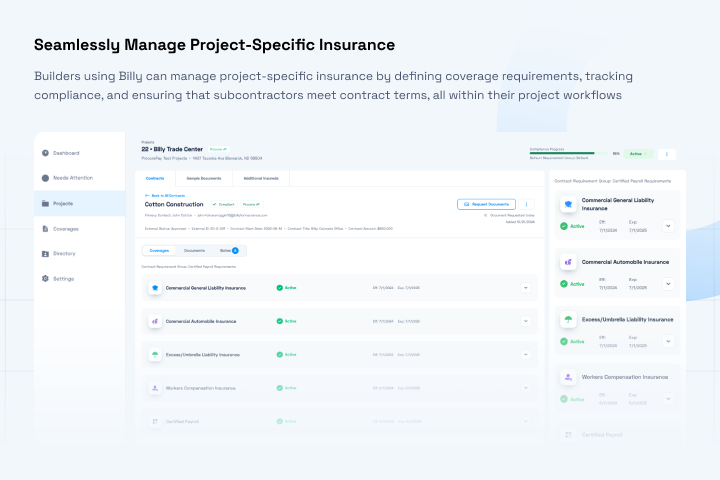
Step 4: Surface it inside Procore where the work happens
Owner: Ops / Procore Admin
If the NTO lives outside Procore, PMs won’t see it when they need it (commitments, vendor conversations, pay apps, closeout).
With Billy’s Procore integration:
- NTOs are visible inside commitments, ProcorePay and vendor insurance records
- PMs don’t need another system
- Risk/accounting isn’t constantly pulled into “can you find this?” requests
Result: visibility without more tools or training.

Step 5: Preserve a defensible audit trail
Owner: Risk + Accounting
When disputes happen, you need clean answers fast:
- When was the NTO received?
- Which project + vendor does it apply to?
- Was the sender compliant at that time?
- What actions did you take?
Billy helps maintain an audit trail showing receipt, project/vendor association, compliance status, and actions taken (reviewed/accepted/flagged).
What “Good” Looks Like: The NTO Operating Standard
If you want a simple internal standard for your team, use this:
Every NTO must have:
- A stored document (PDF)
- Receipt date captured
- Vendor linked
- Project linked
- COI verified + requirement check completed
- Visible in Procore (commitment/vendor record)
- Audit trail retained for review
This is how you reduce last-minute chaos at payment/closeout and keep teams focused on building—not policing paperwork.
Where Billy Fits (Without Changing How Your Team Works)
Billy helps Florida contractors:
- Centralize NTOs with COIs, W-9s, licenses, permits, and other compliance documents
- Attach each NTO to the right vendor + project
- Show NTOs inside Procore where teams already work
- Tie NTO handling to insurance compliance
- Maintain a clear audit trail for defensible records
This isn’t just document storage; it’s operational risk control.
FAQ: Notice to Owner Tracking in Procore
How do Florida general contractors track Notice to Owner (NTO) documents in Procore?
A practical approach is to log the NTO upon receipt, link it to the correct vendor and project, verify insurance compliance, and surface the record inside Procore where teams work (e.g., commitments and vendor records), while preserving a defensible audit trail.
What’s the best workflow for processing an NTO at a GC?
The standard 5-step workflow is: capture the NTO upon receipt, match it to the correct vendor and project, verify compliance/COI requirements, notify project/accounting stakeholders, and retain an audit trail of actions taken.
Why should an NTO be linked to both the vendor and the project?
Linking an NTO to both vendor and project ensures the notice is discoverable during commitment, payment, and closeout workflows, and prevents misfiling that can create disputes and increased lien exposure.
Should GCs verify COI compliance when they receive an NTO?
Yes. An NTO is a risk signal. Verifying a valid COI and checking project-specific requirements helps identify uninsured or under-insured parties and missing endorsements early—before payment or legal exposure.
What audit trail should a GC keep for NTO documents in Florida?
At minimum: receipt date, associated vendor and project, compliance status at time of receipt, and actions taken (reviewed, accepted, flagged), so the record is defensible for audits, disputes, and legal review.
See the NTO Workflow Inside Procore
If you’re managing NTOs across multiple projects and vendors, you don’t need more folders—you need a system.
Book a walkthrough: https://billyforinsurance.com/request-demo/