TL;DR
- Construction GCs need COI tracking built for their workflows, not generic compliance tools.
- Billy is the only construction-specific platform offering both managed services and self-service COI tracking.
- 7 tools reviewed: Billy, Jones, myCOI, TrustLayer, CertFocus, Certificial, SmartCompliance.
- Evaluation pillars: automated COI collection, vendor prequalification, policy verification accuracy.
- 👉 See the full breakdown of Billy’s COI tracking for GCs
A single certificate of insurance takes roughly 30 minutes to review manually. Multiply that across 200 subcontractors on a busy GC’s roster: 100 hours of admin work just to confirm everyone’s coverage is current. One missed renewal doesn’t just create paperwork. It can halt a pour, delay a close-out, or leave your firm holding a claim that should have been the sub’s problem.
Spreadsheets and email reminders work fine at 20 subs. They fall apart past 50. Construction firms have caught on. A 2023 Deloitte study found technology adoption across the industry jumped 20% between 2022 and 2023, with the average GC now running 6.2 digital tools in daily operations. COI tracking software is one of the highest-impact additions to that stack.
Speed versus accuracy used to be a real tradeoff. OCR could process certificates fast; a human could catch endorsement gaps. Getting both required overstaffing. AI plus human review has collapsed that compromise. So the question now is straightforward: which platform actually fits construction workflows? Not every option does.
This guide evaluates seven COI tracking software platforms through a construction-first lens, comparing them across automated COI collection, vendor prequalification, policy verification accuracy, and integration depth with the systems GCs already use.
What Is COI Tracking Software?
COI tracking software automates the request, collection, verification, and renewal of certificates of insurance from vendors and subcontractors. Instead of chasing PDFs via email and logging expiration dates in a spreadsheet, the software handles compliance workflows automatically: sending requests, reading documents with AI, flagging deficiencies, and triggering renewal reminders before gaps appear.
Why Construction Teams Need Specialized Tools
Generic compliance platforms treat a COI like any other document to store and timestamp. Construction COIs require endorsement-level review. Your risk manager needs to verify that a sub’s GL policy names your firm as additional insured on a per-project basis, that workers’ comp limits meet your contract thresholds, and that umbrella coverage layers correctly. Project-level compliance tracking is fundamentally different from standard vendor management.
Integration depth is another separator. If your project management lives in Procore, your accounting runs through Sage or Viewpoint, and your contracts flow through DocuSign, the COI platform needs to connect with those systems. A tool that can’t pull vendor data from Procore or push compliance status back into your project record creates double entry. Your team won’t use it consistently.
Three Service Models in the Market
The COI tracking category has settled into three distinct service models. Understanding the differences narrows your shortlist quickly:
- AI + Human Review (Managed): AI extracts data and screens for obvious issues. Human reviewers (often with insurance expertise) handle complex endorsements, coverage disputes, and edge cases. Best for GCs managing hundreds or thousands of subs who don’t want to build an internal compliance review team.
- Software + Self-Service: Automation tools (OCR, templates, reminders, dashboards) are yours, but your staff handles the review and follow-up. Lower cost, but requires in-house insurance knowledge.
- Verification Networks: Carrier-direct data feeds that confirm coverage without scanning documents at all. Strong for broker-heavy workflows, but limited as a standalone compliance management system.
Pricing varies by model: self-service platforms typically run $3 to $10 per vendor per year, while managed services range from $10 to $30 per vendor per year.
The 7 Best COI Tracking Software Tools for Construction (2026)
1. Billy
Best for: Construction general contractors managing 50 to 1,000+ subcontractors across multiple active projects.
Category: AI + Human Review (Managed) or Self-Service
Billy is the only construction-specific COI tracking platform offering both managed services and self-service under one roof. That flexibility matters operationally: a mid-size GC can start with self-service, then scale into managed review as project volume grows, without migrating to a different vendor.
The integration list reflects construction workflows specifically: Procore Side Panel, Autodesk, CMiC, Sage 300, Sage Intacct, JD Edwards, Viewpoint Vista, Acumatica, and DocuSign. The Procore Side Panel integration deserves particular attention. Most competitors offer standard Procore connections (import/export with some manual steps). Billy’s Side Panel integration operates inside Procore itself, enabling automatic data transfer with zero manual entry. Compliance managers can review sub insurance status without leaving their project management environment.
Billy’s Insurance Wallet lets vendors upload certificates without creating an account or logging in. Vendor friction is one of the biggest reasons COI collection stalls. When a framing sub has to create yet another portal account to upload a PDF, the email sits in their inbox for weeks. Removing the login requirement accelerates collection measurably.
Billy’s AI Review Assistant is trained on construction-specific documents: general liability endorsements, workers’ comp certificates, builders risk policies, and the formatting variations that come with them. Billy tracks beyond COIs as well, handling W9s, business licenses, lien waivers, and warranty forms in the same hub. The vendor prequalification tool screens subcontractors before onboarding, combining insurance verification with license and tax document checks.
Pros
- Both managed and self-service options let GCs choose based on team capacity and budget, with the ability to switch as needs change.
- Procore Side Panel integration enables automatic data sync inside Procore itself, eliminating tab-switching and manual compliance updates.
- No vendor login required through Insurance Wallet, which removes the friction that delays certificate collection from subcontractors.
- AI trained on construction documents catches endorsement gaps specific to GL, WC, umbrella, and builders risk policies.
- Full compliance lifecycle coverage includes W9s, business licenses, lien waivers, and warranty forms alongside COIs.
- Vendor prequalification screens subs before onboarding, so compliance gaps surface before the first day on site.
Cons
- Volume-based pricing means smaller GCs (under 25 subs) should run the ROI calculator before committing to confirm the cost-per-vendor justifies the investment.
- Managed tier costs more than self-service alternatives, though the human review layer offsets the need for in-house insurance expertise.
Pricing
- Self-service: approximately $3 to $10 per vendor per year
- Managed services: approximately $10 to $30 per vendor per year
- Volume-based; ROI calculator available
User Ratings
- Capterra: 4.7/5 (31 reviews), with consistent praise for ease of use and Procore integration
- Software Advice: 4.7/5 (31 reviews)
2. Jones
Best for: Enterprise teams managing compliance across both construction and real estate portfolios.
Category: AI + Human Review (Managed)
Jones offers full-service managed compliance with AI-powered COI processing and dedicated compliance team support. Jones integrates with Procore, MRI Software, and CMiC, and includes a “Jones Network” data product for carrier and broker connectivity.
Jones works well for organizations that straddle construction and real estate. But for a GC who never touches a lease, the real estate half of Jones’s product creates friction in ways that aren’t obvious during the sales demo. Compliance templates default to property management language. Workflow automations assume lease-cycle timelines rather than project mobilization schedules. When you call support, your ticket competes with a property manager asking about tenant COIs. Feature requests from real estate clients shape the roadmap alongside contractor needs.
Pros
- High-volume COI processing handles large certificate loads with AI extraction and human review.
- Procore and CMiC integrations connect to core construction project management platforms.
- Dedicated compliance team provides hands-on support for complex endorsement review.
Cons
- Compliance templates and workflow defaults reflect the real estate side of Jones’s business as much as construction. A GC will spend time reconfiguring settings that a property manager would use out of the box.
- Vendor portal login required for document uploads. Subs need to create an account before they can submit a certificate, which delays collection, particularly with smaller trade contractors who resist adding another login to their list.
- Standard Procore API only. No Side Panel access, so compliance managers toggle between tabs rather than working inside Procore directly.
Pricing: Contact sales for pricing.
For a detailed feature-by-feature breakdown, see the Billy vs. Jones comparison.
3. myCOI
Best for: High-volume multi-industry organizations tracking thousands of certificates across diverse vendor types.
Category: AI + Human Review (Managed)
myCOI is one of the longest-running COI tracking platforms, built for heavy automation at scale. myCOI handles large certificate volumes and recently merged with illumend.ai to strengthen AI processing capabilities. myCOI serves construction alongside non-profit, education, and other industries.
Pros
- Strong automation at scale for organizations processing thousands of certificates monthly.
- Renewal reminders and compliance reporting keep large vendor rosters current without manual calendar tracking.
- AI-powered processing through the illumend.ai merger adds document intelligence to the managed review workflow.
Cons
- myCOI’s roots are in non-profit and education compliance, and it shows. The platform handles standard ACORD forms well, but construction-specific endorsements (additional insured on a per-project basis, builders risk requirements, wrap-up exclusions) don’t get the same depth of automated review. No Procore Side Panel, and ERP connectivity for Sage or Viewpoint users is limited.
- Enterprise pricing isn’t transparent. Small and mid-size GCs report difficulty getting clear quotes without extended sales cycles.
- The illumend.ai merger closed recently, and the AI integration is still in progress. A GC evaluating myCOI today is betting on future construction-document intelligence rather than testing proven capability. Ask to see the AI handle a real builders risk certificate during your demo.
Pricing: Contact sales (enterprise-focused).
4. TrustLayer
Best for: Risk managers who prioritize vendor collaboration and cross-functional visibility.
Category: Software + Self-Service (AI-powered)
TrustLayer takes a network-first approach to COI tracking. TrustLayer connects 298,810 companies and learns from over 400,000 COIs processed monthly. Like Billy, TrustLayer requires no vendor login for document submission, keeping the sub experience low-friction.
TrustLayer is built for collaboration across risk managers, finance teams, and project managers. Its AI continuously improves as the network grows, flagging coverage gaps with vendor-specific insights.
For a deeper look at how TrustLayer compares to alternatives like Billy, Jones, and myCOI, see our TrustLayer alternatives guide.Pros
- No vendor login required keeps document submission frictionless for subcontractors and vendors.
- AI learns from 400,000+ COIs monthly, improving accuracy as the network expands.
- Coverage gap flagging provides actionable, vendor-specific insights rather than generic alerts.
Cons
- No managed services option. Self-service works until your team hits a complex additional-insured endorsement with unusual language, or an excess liability structure they haven’t seen before. There is no human escalation path. Your compliance manager either figures it out or calls your broker.
- TrustLayer’s AI trains on COIs from every industry. The model sees healthcare facility certificates, tech vendor COIs, and construction COIs in the same pool. It will catch a missing GL limit. It is less reliable on a missing builders risk endorsement or a wrap-up exclusion that a construction-trained reviewer would flag immediately.
- Construction ERP connections are thin. No Procore Side Panel, no Sage or Viewpoint integration. If Procore is your operating system, TrustLayer sits outside it.
Pricing: Contact sales for pricing.
5. CertFocus (by Vertikal RMS)
Best for: Large enterprises with dedicated risk management staff and complex compliance requirements.
Category: Full-Service Managed
CertFocus is the oldest COI tracking platform in the market. It was built before Procore existed, before construction went digital. Its differentiator is human expertise: account managers are licensed insurance professionals who handle compliance review with deep coverage knowledge. CertFocus serves multiple industries, construction included.
Pros
- Licensed insurance-professional account managers bring subject matter expertise that AI-only platforms can’t replicate.
- Enterprise-grade automation handles reporting, renewal tracking, and compliance dashboards at scale.
- Deep compliance expertise baked into the service model reduces the burden on your internal team.
Cons
- CertFocus’s age shows in the interface and the integration story. The platform predates the modern construction tech stack. There is no Procore integration (Side Panel or otherwise), no Sage connector, no Viewpoint sync. Compliance data lives in CertFocus and stays there unless your team exports and re-enters it.
- No construction-specific review logic. CertFocus applies the same verification process to a hospital vendor COI and a concrete sub’s builders risk certificate. Construction-specific endorsement gaps require your account manager to catch them manually.
- Priced and scoped for large enterprises. If you’re a 50-sub GC, CertFocus’s sales process and onboarding overhead will feel disproportionate to your needs.
Pricing: Contact sales (enterprise).
6. Certificial
Best for: Organizations with strong broker relationships that want carrier-direct verification instead of document scanning.
Category: Verification Network
Certificial takes a fundamentally different approach. Rather than scanning uploaded PDFs, Certificial connects directly to insurance carriers and brokers to pull verified coverage data in real time. Carrier-validated data eliminates the risk of fraudulent or altered certificates, a concern that document-scanning platforms can only partially address.
Pros
- Carrier-validated coverage data is verified at the source, removing document fraud risk entirely.
- Real-time verification status updates as policies change, rather than waiting for renewal uploads.
- Direct carrier connections provide higher data confidence than OCR-based document reading.
Cons
- Network dependency is the real constraint. If a sub’s carrier or broker isn’t connected to Certificial, you’re back to collecting and reviewing PDFs manually for that vendor. Regional carriers and specialty insurers (common in construction) are often missing from the network. One GC might have 80% of subs verified through Certificial and still need a separate process for the remaining 20%.
- Certificial verifies coverage. It does not manage compliance. No prequalification, no follow-up workflows, no document storage for W9s or lien waivers. You will need a second system for everything beyond verification.
- The broker-intermediary model adds a step for some GCs. If your subs manage their own insurance (common with smaller trades), Certificial’s approach routes through a broker who may not be responsive. That can slow verification rather than accelerate it.
Pricing: Contact sales for pricing.
7. SmartCompliance
Best for: Small businesses or owner-operators with fewer than 25 active subcontractors.
Category: Software + Self-Service
SmartCompliance offers a modern, intuitive interface designed for teams without dedicated compliance staff. SmartCompliance handles basic COI tracking with light automation, making it accessible for smaller operations.
Pros
- Modern, intuitive interface lowers the learning curve for teams new to COI tracking software.
- Accessible for small teams that lack dedicated compliance or risk management personnel.
- Lower barrier to entry in both pricing and implementation complexity.
Cons
- “Light automation” means reminders and basic OCR. That’s roughly where it stops. SmartCompliance does not review endorsements, flag coverage gaps by policy type, or provide escalation workflows for disputes. A GC at 30 subs will start noticing what’s missing: no way to verify that additional insured language matches contract requirements, no builders risk review, no automatic follow-up sequences when a sub ignores the first request.
- Zero construction integrations. No Procore, no Sage, no Viewpoint, no CMiC. SmartCompliance lives in its own browser tab, disconnected from your project management and accounting systems. Every compliance update requires manual re-entry somewhere else.
- No upgrade path to managed services. When your operation grows past 25 subs and you need human review support, you will be migrating to a different vendor entirely. That means re-onboarding every sub.
Pricing: Contact sales for pricing.
Summary Comparison Table
| Tool | Best For | Service Model | Construction Integrations | Vendor Login | Pricing |
|---|---|---|---|---|---|
| Billy | Construction GCs (50–1,000+ subs) | Managed + Self-Service | Procore Side Panel, Autodesk, CMiC, Sage, JDE, Viewpoint, DocuSign | No | $3–$30/vendor/yr |
| Jones | Construction + Real Estate Enterprise | Managed | Procore (standard), CMiC, MRI | Yes | Contact sales |
| myCOI | High-Volume Multi-Industry | Managed | Limited construction-specific | Varies | Contact sales |
| TrustLayer | Risk Managers / Collaboration | Self-Service (AI) | Limited | No | Contact sales |
| CertFocus | Enterprise / Insurance Teams | Full-Service Managed | Multi-industry | Varies | Contact sales |
| Certificial | Broker-Heavy Workflows | Verification Network | Limited | No | Contact sales |
| SmartCompliance | SMBs / Light Tracking | Self-Service | Minimal | Varies | Contact sales |
Ready to see construction-specific COI tracking in action?
Start free with Billy or request a demo to see the Procore Side Panel integration.
Why Billy Leads for Construction COI Compliance
Most platforms in this comparison serve construction as one vertical among several. Jones splits attention between construction and real estate. myCOI and CertFocus serve education, non-profits, and other industries alongside contractors. TrustLayer and Certificial take industry-agnostic approaches.
Billy is built exclusively for construction GCs. Every feature, every integration, and every AI training dataset reflects that focus.
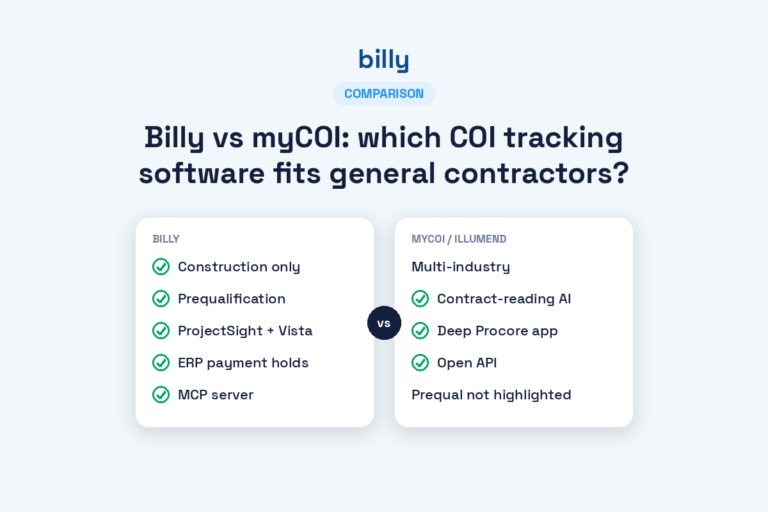
Billy vs. Jones: Billy is construction-only; Jones serves construction and real estate. Billy offers Procore Side Panel; Jones offers standard Procore integration. Billy’s Insurance Wallet requires no vendor login; Jones requires vendors to use a portal. Billy offers both managed and self-service; Jones is managed-only.
Billy vs. the field: Billy is the only construction-specific platform that lets a GC start with self-service and upgrade to managed review without switching vendors. The Procore Side Panel integration is unique in the category, providing deeper project management connectivity than any competitor’s standard API connection. The ability to track W9s, business licenses, lien waivers, and warranty forms alongside COIs means one fewer tool in an already crowded tech stack.
For a GC running 6.2 digital tools and managing compliance across dozens of active projects, consolidation and construction-specific depth are the deciding factors.
How We Chose the Best COI Tracking Software Tools
The evaluation framework behind this comparison focused on seven criteria:
- Service model fit: Managed, self-service, or verification network, and whether each platform offers flexibility between models.
- Construction-specific integrations: Procore (and integration depth), Autodesk, CMiC, Sage, Viewpoint, and other construction ERP systems.
- Vendor experience: Login requirements, upload friction, and how quickly subcontractors can submit documents.
- Policy verification depth: AI-only versus AI plus human endorsement review, and how construction-specific the verification logic is.
- Prequalification capabilities: Whether each platform screens vendors before onboarding or only tracks compliance after.
- User ratings: Capterra and Software Advice scores, weighted for review volume and construction-specific feedback.
- Pricing transparency: Published ranges, per-vendor models, and fit across GC size segments.
FAQs
What is COI tracking software?
COI tracking software automates certificate of insurance collection, verification, and renewal. It replaces manual spreadsheet tracking with automated compliance workflows that request documents from vendors, read them with AI, flag deficiencies, and trigger reminders before coverage lapses. Billy handles COIs plus W9s, business licenses, and lien waivers in one platform.
How do I choose the right COI tracking software for construction?
Start with construction-specific integrations. If your operation runs on Procore, Autodesk, or CMiC, confirm that each platform connects natively. Then evaluate the service model: managed review is best if you lack in-house insurance expertise, while self-service works for teams with compliance staff. Billy offers both options, letting GCs choose based on current volume and team capacity.
Is Billy better than Jones for general contractors?
Billy is construction-exclusive, while Jones serves both construction and real estate. Billy’s Procore Side Panel offers deeper integration than Jones’s standard Procore connection. Billy requires no vendor login through its Insurance Wallet; Jones requires vendors to use a portal. Billy also provides both managed and self-service options, while Jones offers managed-only.
How does COI tracking relate to vendor prequalification?
Prequalification screens vendors before onboarding. COI tracking monitors ongoing compliance after they’re approved. Billy’s prequalification tool combines insurance verification with W9 and license checks, creating a full vendor compliance lifecycle from initial screening through project close-out.
What’s the difference between managed and self-service COI tracking?
Managed services combine AI extraction with human reviewers who handle endorsements, coverage disputes, and edge cases on your behalf. Self-service platforms give you the automation tools, but your team handles review and follow-up. Billy offers both under one roof; most competitors offer only one model.
How quickly can I see results after switching to COI tracking software?
Automated collection reduces follow-up time from day one. Procore integration eliminates manual data entry immediately upon setup. Compliance gap visibility improves within the first certificate review cycle, typically within the first week of active use.
What’s the best alternative to Jones for construction COI tracking?
Billy covers construction exclusively, while Jones splits focus between construction and real estate. Billy’s Procore Side Panel, Insurance Wallet, managed plus self-service flexibility, and 9+ construction integrations exceed Jones’s feature set for GCs.
How much does COI tracking software cost?
Self-service platforms typically cost $3 to $10 per vendor per year. Managed and full-service platforms range from $10 to $30 per vendor per year. Billy uses volume-based pricing across both service tiers.