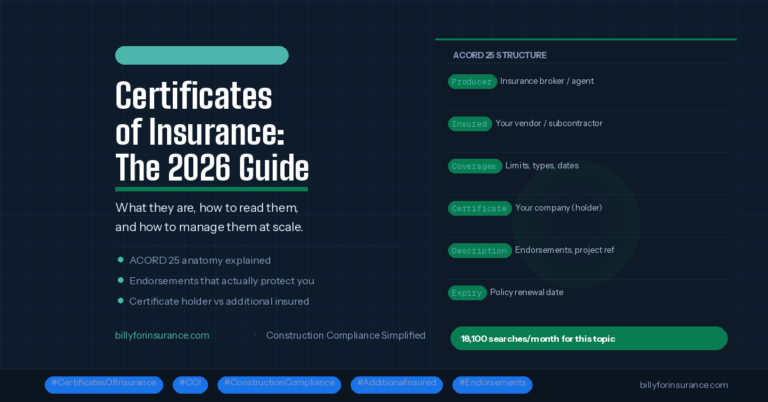
How to review COIs, extract contract requirements, avoid compliance gaps, and automate the process with Billy’s AI.
What You’ll Learn
- How to review a COI step-by-step
- How to extract insurance requirements from contracts
- What endorsements matter
- Common compliance failures
- How subcontractors can avoid back-and-forth
- How Billy’s AI automates COI and endorsement review
- FAQs, templates, checklists, and more
What a Certificate of Insurance Actually Is (and Isn’t)
A COI (ACORD 25) is a snapshot of insurance coverage on the date it was issued.
A COI is:
- Evidence of coverage
- A summary of policy limits and dates
- A reference for compliance requirements
A COI is not:
- Proof of coverage
- A legally binding contract
- Additional Insured verification
- A substitute for endorsements
If the coverage is not written in the endorsement, it does not legally apply. That’s why COI review must include:
Contract → COI → Endorsements
How to Extract Insurance Requirements From Your Contract
Before reviewing any COI, you must know what the contract requires.
1. Locate the Insurance Exhibit
It may appear as:
- Insurance Requirements
- Exhibit D
- Attachment B
- Schedule of Coverages
2. Identify Required Coverages
Look for:
- General Liability
- Auto Liability
- Excess/Umbrella
- Workers’ Comp & Employers Liability
- Pollution Liability (if required)
- Professional Liability (if required)
3. Identify Required Endorsements
These determine whether coverage actually applies:
- Additional Insured – CG 20 10
- Additional Insured – Completed Operations – CG 20 37
- Blanket AI wording
- Primary & Non-Contributory
- Waiver of Subrogation
- Per Project Aggregate
- Ongoing vs Completed Operations
4. Create a Requirements Checklist
Every reviewer should evaluate COIs against the same criteria.
Billy provides configurable templates so teams have consistent, accurate reviews.
How to Review a Certificate of Insurance: Step-by-Step
1. Verify the Named Insured
The insured name must match the contracting entity exactly.
Common issues include DBAs missing, parent companies listed, or incorrect legal names.
2. Compare Policy Limits to Contract Requirements
Check limits for:
- General Liability
- Auto Liability
- Excess/Umbrella
- Workers’ Compensation & Employers Liability
Common failures:
- $1M/$2M GL when $2M/$4M is required
- Auto lacking “Any Auto”
- Umbrella limits too low
3. Check Effective and Expiration Dates
Look for:
- Policies already expired
- Policies expiring mid-project
- Gaps in coverage
Billy automatically tracks expirations and notifies vendors before lapses.
4. Verify Additional Insured Status
The COI checkbox does not count.
You must have endorsements such as:
- CG 20 10
- CG 20 37
- Blanket Additional Insured
5. Confirm Waiver of Subrogation
Must be granted by endorsement — not just referenced on the COI.
6. Check Primary & Non-Contributory
Required on many contracts but often missing on endorsements.
7. Completed Operations Coverage
This is one of the most commonly missing requirements.
You need:
- CG 20 37
or - A blanket endorsement that explicitly includes completed operations.
Most Common COI Compliance Failures (Based on 500,000+ Reviews)
- Missing Additional Insured endorsement
- Wrong AI form (CG 20 10 but no CG 20 37)
- Insufficient limits
- Expired policies
- Incorrect insured names
- Missing Waiver of Subrogation
- No Primary & Non-Contributory
Billy’s AI flags each of these automatically.
Manual Review vs. Billy AI Review
| Task | Manual Process | With Billy |
|---|---|---|
| Review COI limits | 3–5 minutes | Instant |
| Read endorsements | 5–15 minutes | Instant |
| Identify missing AI forms | Requires expertise | Auto-detected |
| Track expirations | Spreadsheet | Automated |
| Email reminders to vendors | Manual | Automatic |
| Sync compliance to Procore/Sage | Manual | Integrated |
| Audit trail | Scattered files | Fully logged |
For Subcontractors: How to Submit a COI Correctly
Most subs don’t know exactly what GCs require. To avoid delays, subcontractors should:
- Ensure the insured name matches the contract
- Include all required endorsements
- Confirm limits meet requirements
- Provide non-expired policies
- Upload renewed COIs before expiration
Billy’s Vendor Portal provides instant AI feedback and reduces back-and-forth significantly.
Introducing Billy’s Compliance Risk Score
Billy automatically categorizes each vendor:
Green: Fully compliant
Yellow: Minor gaps or upcoming expirations
Red: Missing critical items (endorsements, limits, expired coverage)
This helps project teams and finance understand risk at a glance.
Frequently Asked Questions
Is a COI legally binding?
No. Only endorsements and the policy itself determine coverage.
Do I need endorsements if the COI says “as required by contract”?
Yes. COI language is informational only.
What if a vendor’s policy expires mid-project?
A renewal COI + updated endorsements are required.
How often should COIs be reviewed?
At onboarding and every renewal.
Which endorsements confirm Additional Insured?
Typically CG 20 10 + CG 20 37 or equivalent blanket endorsements.
Is Workers’ Comp required in all states?
Yes, with limited exceptions.
Social Proof
Billy has reviewed over 500,000 COIs and endorsements across more than 50,000 vendors, supporting leading GCs such as:
- Kitchell
- Wagman
- Hedrick Brothers
- Erickson-Hall
These companies rely on Billy to streamline compliance and reduce insurance risk.
The Future of COI Review: AI-Powered Risk Automation
COI review is shifting from manual verification to automated intelligence.
Billy is building the next generation of compliance technology:
- AI extraction of insurance requirements from contracts
- Automatic comparison of contract → COI → endorsements
- Predictive alerts for likely coverage lapses
- AI explanations of coverage gaps in plain English
- Broker integrations for seamless renewals
This is how modern construction teams stay ahead of compliance risk.
Free Resources
Download free resources to help standardize your COI process:
- COI Review Checklist
- Endorsement Cheat Sheet
- Insurance Requirements Template
- Vendor COI Submission Guide
- Free W-9 Generator
Try Billy’s AI Review Assistant — upload your first COI free.
No credit card required. Instant results.
Reviewing COIs doesn’t need to be slow, confusing, or risky. With the right workflow and the right technology, you can eliminate hours of administrative work, reduce liability, and keep your projects moving.
Billy’s AI Review Assistant, endorsement detection, vendor automation, expiration tracking, and integrations with Procore and Sage give you a modern, scalable way to manage compliance with confidence.